



elianoimperato
Known Participant
December 19, 2025
Answered

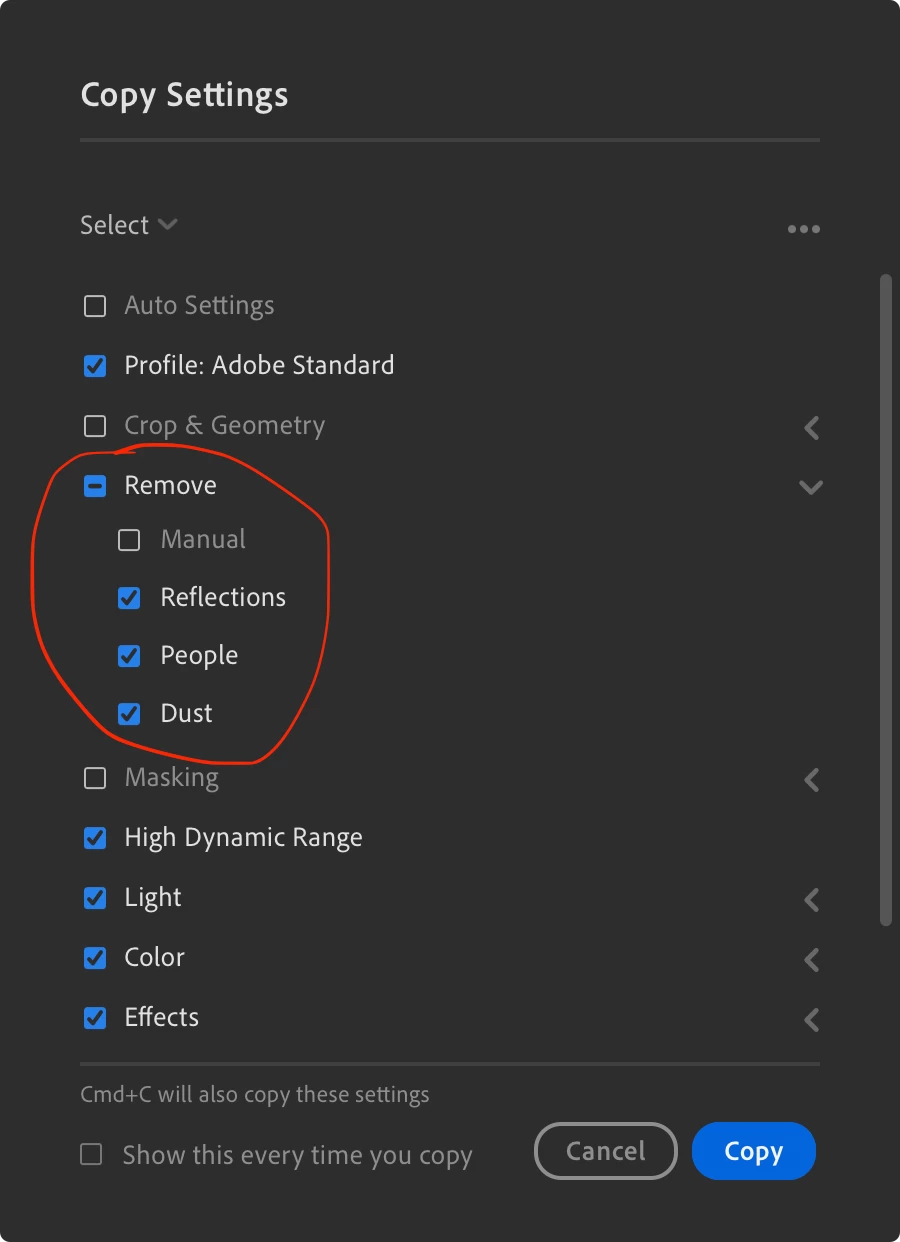
Copy Settings default with Remove group (Reflections, People, Dust) selected

  • December 19, 2025
  • 2 replies
  • 115 views

Hi,


I noticed that the Copy Settings as default has selected also the Remove group (Reflections, People, Dust). Personally, I think that when you're copying the modified settings from a photo to paste to another photo, or a batch of photos, shouldn't has the Remove group selected, like already is set for the Masking group.


Cheers,

eliano
 

870660iD757570AA3FE8B0E.png

Correct answer Jim Wilde

You can change the defaults to whatever you want (select the settings that you want to have enabled by default, then click the tri-dot icon to the right of the "Select" line and click on "Set as Default"). 

2 replies

Jim Wilde
Community Expert
Jim WildeCommunity ExpertCorrect answer
Community Expert
December 19, 2025

You can change the defaults to whatever you want (select the settings that you want to have enabled by default, then click the tri-dot icon to the right of the "Select" line and click on "Set as Default"). 

Sameer K
Community Manager
Community Manager
December 19, 2025

Hey, @elianoimperato. Welcome to the Lightroom Community. Thanks for raising this. Currently, all the applied edits are checked by default.


You can click to uncheck the Remove section.

Thanks!
Sameer K
(Type '@' and type my name to mention me when you reply)
