
Copying LR files to external drive
I have just run 160 of my best work thru LR for the first time! Love it!
When I open them in my desktop of course LR is already there. How can I copy them to a flash drive? Do the LR edits go with the photo files?
I have just run 160 of my best work thru LR for the first time! Love it!
When I open them in my desktop of course LR is already there. How can I copy them to a flash drive? Do the LR edits go with the photo files?
"How can I copy them to a flash drive? Do the LR edits go with the photo files?"
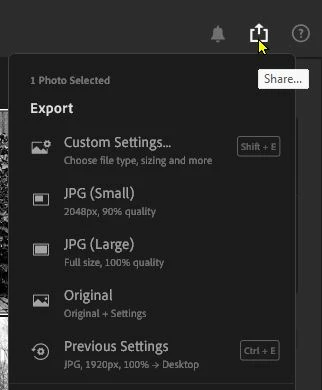
Export/Share the images to the flash drive.
JPG is easiest. TIF (and others) are available in the Custom Settings. Both JPG and TIF create a new file with the edits 'burnt in' to the image viewable by almost anyone.
'Original + Settings' will export a DNG file with edits embedded, but only viewable as edited in other Adobe apps that can read the edit metadata.

Already have an account? Login
Enter your E-mail address. We'll send you an e-mail with instructions to reset your password.