
Participant
July 28, 2018
Answered

Copying manual lens correction profile has stopped working

  • July 28, 2018
  • 1 reply
  • 928 views

I shoot mainly with manual lenses, so this bug makes lightroom unusable for me.

Prior to the update, where bulk editing was introduced, you could copy and paste a photo's edit. It also pasted the lens profile.

Why is it important? Because when you use a manual lens, you have to manually pick its' profile, out of hundreds of available lens profiles.

Reading about the new update, I rejoiced - I could batch edit my photos, apply my lens profile, so much time would be saved.

Alas, when batch edit with the lens correction profile ticked - the only thing that's pasted, is that the following checkbox is ticked
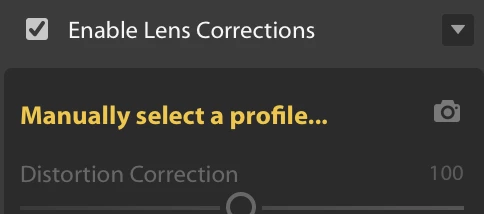
You still have to manually select the profile.

Is there a workaround?

Thanks

This topic has been closed for replies.
Correct answer MassC

Hi There,

We're sorry to hear you were having such a hard time with copying and pasting lens correction edits.

This issue was fixed in Lightroom CC v.2.0, which was released in October 2018. Let us know if you encounter any issues.

Best,
Carissa 

1 reply

MassC
MassCCorrect answer
Legend
November 15, 2018

Hi There,

We're sorry to hear you were having such a hard time with copying and pasting lens correction edits.

This issue was fixed in Lightroom CC v.2.0, which was released in October 2018. Let us know if you encounter any issues.

Best,
Carissa 

joep50897371
Participant
November 21, 2019

Looks like this is broken again in the latest release. I dont often need to manually select a profile, but I am getting the same result above when I try to copy and paste this setting.