Participant
October 17, 2020
Question

Create a preset on LR Mobile greyed out

  • October 17, 2020
  • 3 replies
  • 892 views

 Purchased a preset package with .DNG filed. I am using an apple iphoe so I saved the files to my file app and uploaded these .dng files on LR. When I tried to "create a preset" it is greyed out. Please help! Photo attached
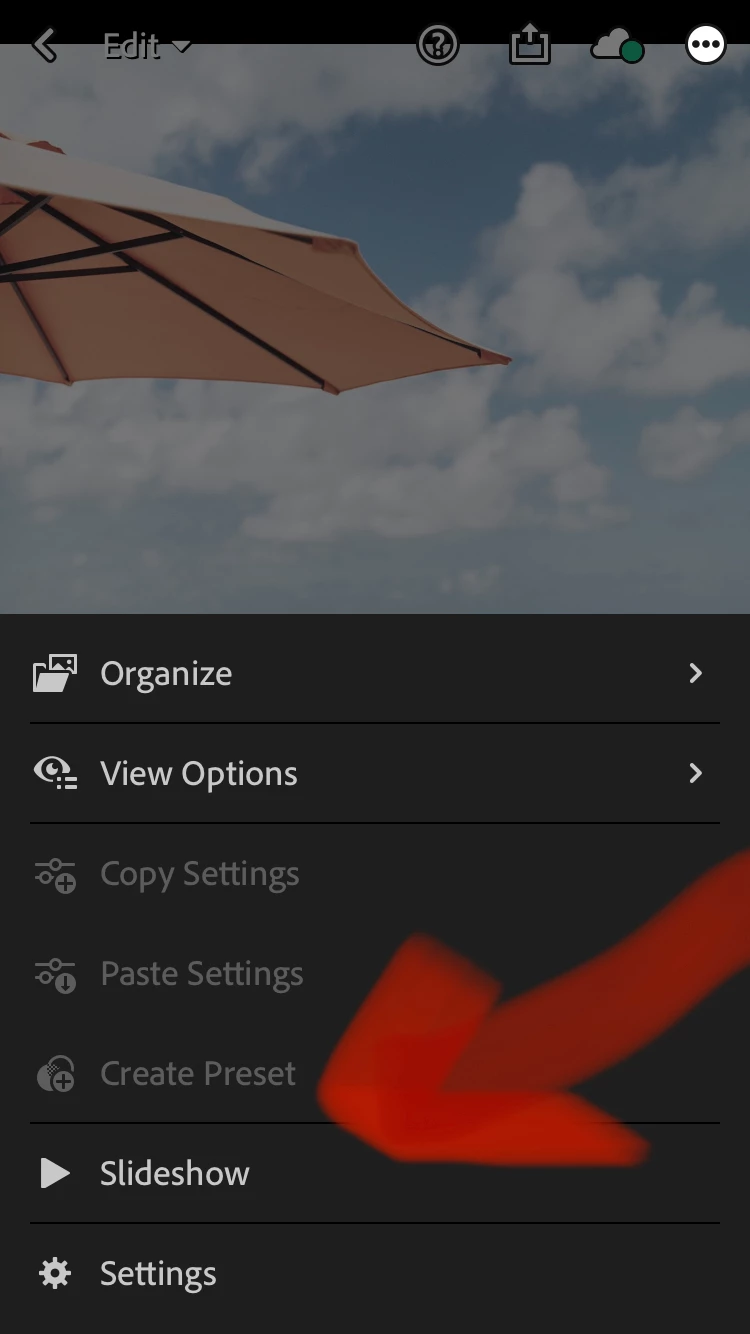
 

{Moved from Lightroom Cloud to Lightroom Mobile & Apple TV Forum by Moderator}

This topic has been closed for replies.

3 replies

trishmennell
Participating Frequently
December 12, 2021

Did you solve this?  I am having the same problem on LR iPad.

Participant
December 12, 2021

Yes, I solved the issue by downloading the new Adobe Lightroom app (not the free version) and then my presets worked. I cancelled my subscription after the free trial And my presets are still active 

greule
Community Manager
Community Manager
October 19, 2020

A couple of questions. Did I get it right that you saved the purchased  preset via "Save to File" or did you upload the dng via Lr Desktop? When you open up the Cloud icon at the top bar, what is listed there? Hope to get a clue about your issue soon. - Guido/ Lr Mobile QE

Rob_Cullen
Community Expert
Community Expert
October 17, 2020

Do you have one of the DNG files selected in the edit screen?

Is that 'umbrella' image one of the purchased 'Preset' DNGs?  (my images never overlap the top icons)


Regards. My System: Windows-11, Lightroom-Classic 15.1.1, Photoshop 27.3.1, ACR 18.1.1, Lightroom 9.0, Lr-iOS 10.4.0, Bridge 16.0.2 .