Participant
April 1, 2020
Question

Crop Overlay change isn't available

  • April 1, 2020
  • 2 replies
  • 277 views

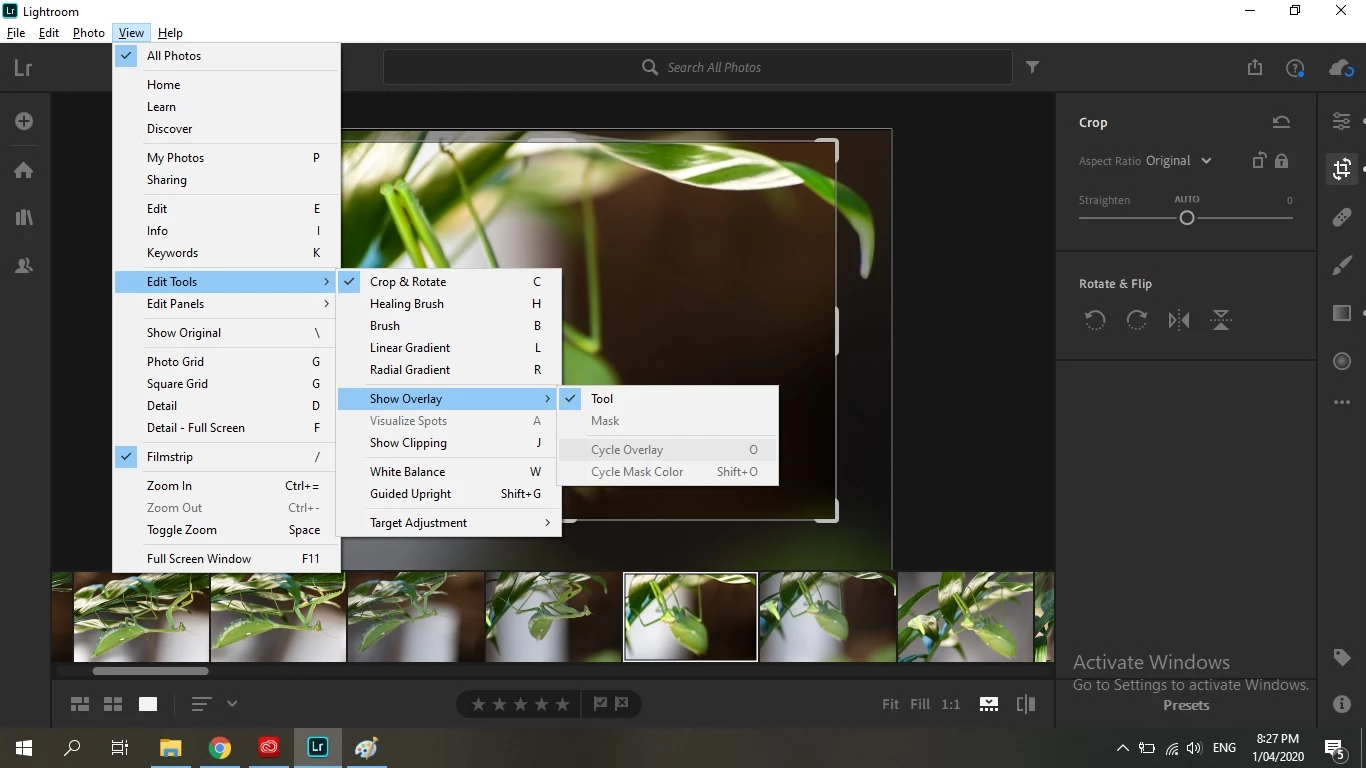
I tried to change the Crop Overlay in Lightroom (just downloaded - April 1st 2020) and I simply cannot change it. Neither using the O key, nor going to 'Tools'. It's just not available? It's exactly like the picture shows. I'd selected the Crop tool before trying. Does anyone know what's happening???


This topic has been closed for replies.

2 replies

99jon
Legend
April 2, 2020

As Robert says, you can tab with the “O”  key to show or hide the crop overlay. But when you have it set to show you do need to move your cursor into the edit space.

Rob_Cullen
Community Expert
Community Expert
April 2, 2020

In the Crop Tool only one overlay is available- and that is the lines of 'Thirds'.

It is either on of off.  [o] is the toggle.


The 'Color' Overlays are only available with Brush and Gradient Tools.

In these tools [o] toggles on/off.  [Shift+o] toggles only two colors: Pink<>Green         


Regards. My System: Windows-11, Lightroom-Classic 15.1.1, Photoshop 27.3.1, ACR 18.1.1, Lightroom 9.0, Lr-iOS 10.4.0, Bridge 16.0.2 .