
Klaas vT
Inspiring
September 11, 2018
Answered

Delete images

  • September 11, 2018
  • 3 replies
  • 1831 views

Hi,

I've been trying out Lightroom CC for the last couple months and loaded all 28000 of my images into the library to try out the Sensei search, etc.

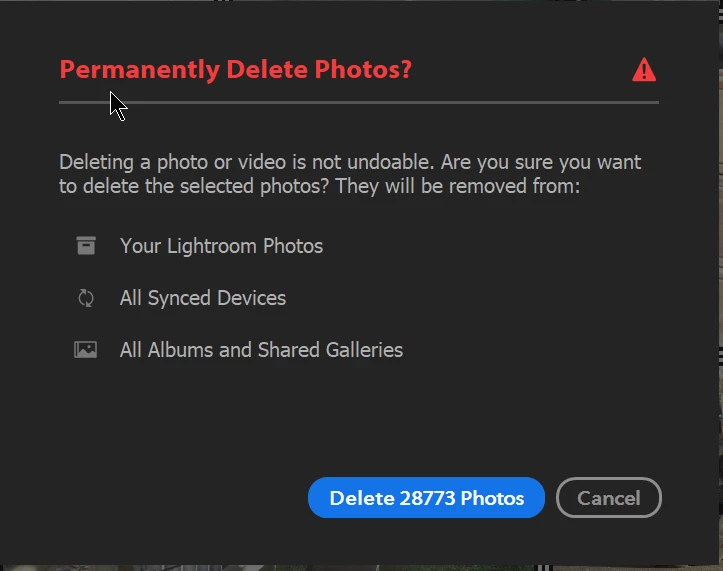
As I cannot share this with my colleagues, this program is not for me (yet)... How can I remove the images from lightroom and delete them off the web drive without effecticting my image library as such? Are the imges still linked to the original files on my network or are they somehow copies? When Lightroom threatens to delete the files from "All Synced Devices" does that mean from my network drive as well?
Thanks!

FYI the search works great and I will use it in the future as soon as we can share a library with our whole team!

For now I'm done paying for the extra TB of storage on the adobe cloud.

Thanks!

Klaas

This topic has been closed for replies.
Correct answer JohanElzenga

The images were copied to the cloud servers, so deleting them from the cloud servers will not affect the local copies on your own network. 'Synced devices' are computers, tablets or phones running Lightroom CC, so again that does not include your own local storage.

3 replies

Participant
September 15, 2020

hello, 

if i delete images on Lightroom mobile, are they also affet to local gallery of iphone??? 

Klaas vT
Klaas vTAuthor
Inspiring
September 11, 2018

OK, I took the plunge. No local files were effected.

I can't wait till Adobe makes Lightroom CC more usefull, it as potential. Hopefully soon, an entire image library could be AI searchable with face recognition like back in the Picassa days. Adobe, can you do as well as Google?

JohanElzenga
Community Expert
JohanElzengaCommunity ExpertCorrect answer
Community Expert
September 11, 2018

The images were copied to the cloud servers, so deleting them from the cloud servers will not affect the local copies on your own network. 'Synced devices' are computers, tablets or phones running Lightroom CC, so again that does not include your own local storage.

-- Johan W. Elzenga
Klaas vT
Klaas vTAuthor
Inspiring
September 11, 2018

Thanks JohanEl54,

Just to clarify: is the image I'm seeing on my computer a copy of the image I originally imported? Or to put it a different way, are the image I see in Lightroom on my desktop actually "stored" on the cloud?