Answered
Delete lightroom cc sync'd photos, leave LR classic photos on desktop alone.
Hi,
There's been a fair amount written about this but I have a very specific question.
The solution proposed to delete CC photos wihout deleting the desktop files has been to go to CC classic, preferences/lightroom sync/delete all synced data.
Unfortunately, this opens a dialog box that says, :
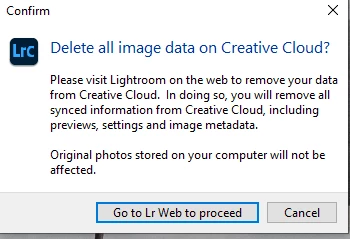
So then click the required box and it just takes me to LR Web. What now? Just select all and hit delete? Is that safe for my local files? seems like I am stuck in a loop.
Thanks
William
 AdChoices