


Known Participant
August 26, 2023
Question

Denoise AI creating artefacts

  • August 26, 2023
  • 2 replies
  • 501 views

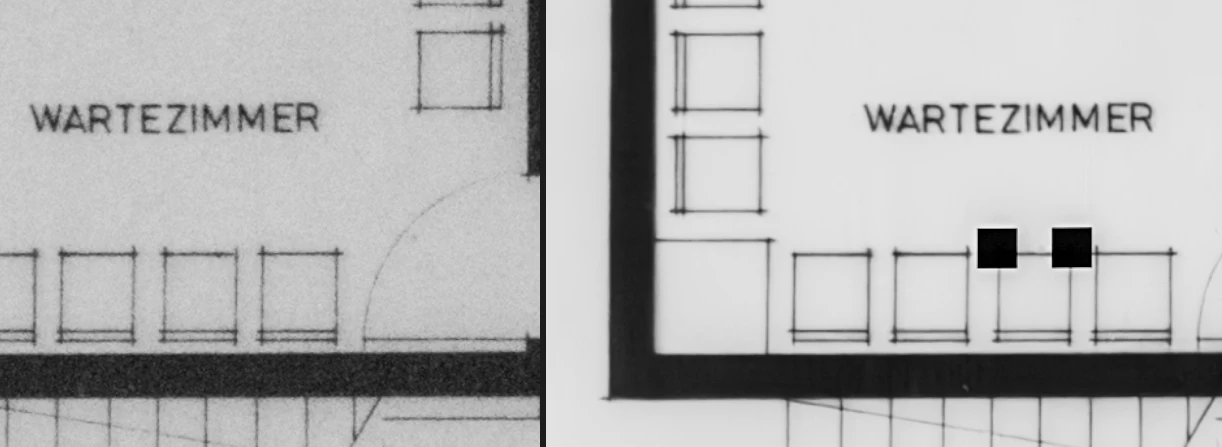
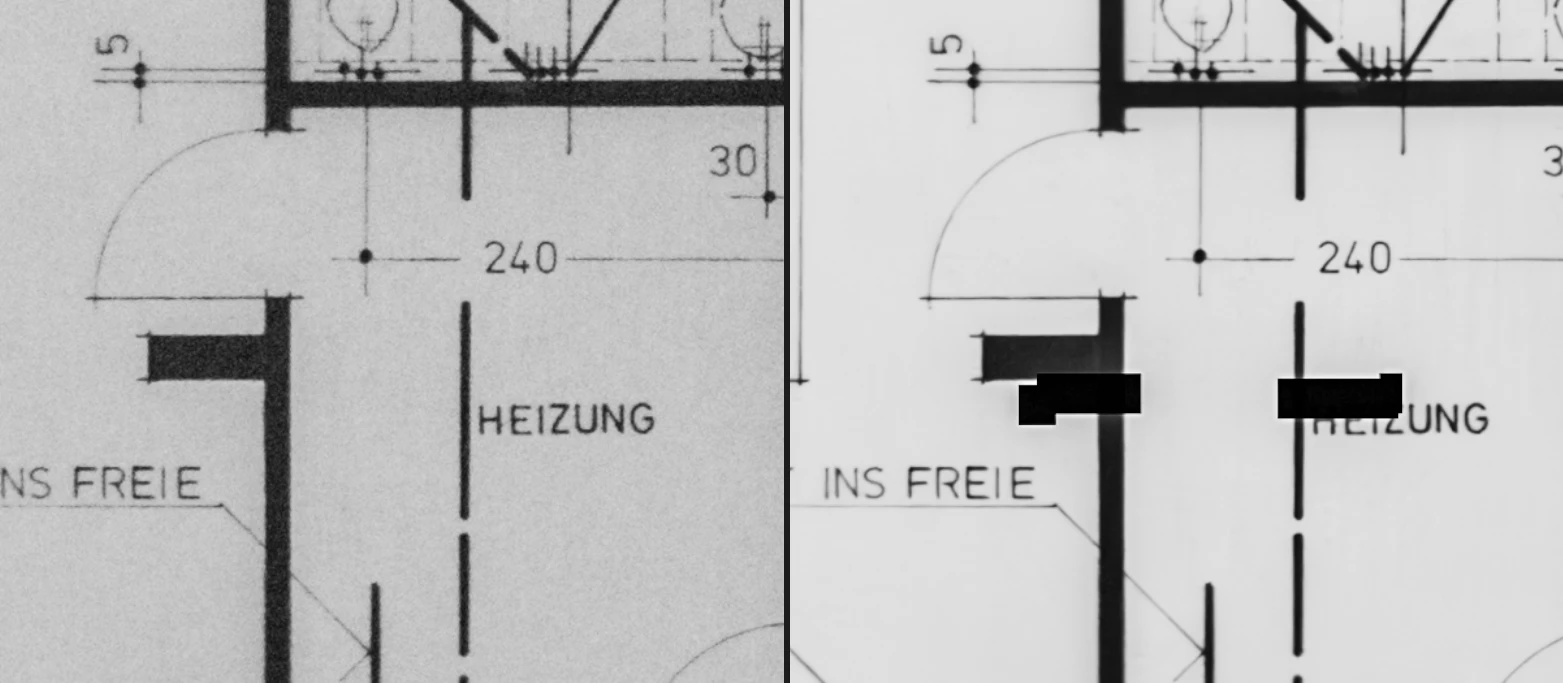
While I like the general results of the new AI denoise feature, I realized in a picture that the AI is creating (randomly?) artefacts on the fotos (black rectangles, see screenshots below; left: original, right: denoised with AI 75%)


This topic has been closed for replies.

2 replies

snappy42Author
Known Participant
September 25, 2023

Found another one (attached). And also a longer thread about similar issues in LR Classic.

snappy42Author
Known Participant
September 25, 2023

Adding system info for completeness:

Lightroom version: 6.5 x64 [ 20230808-1935-ddaacdd ] (Aug 8 2023)
NGL Version: 1.33.0.12
WF Version: 5.5 1def343
VF Version: 1.0.135.5
HIL Version: 40405
CAI Version: adobe_c2pa/0.4.2 c2pa-rs/0.18.0

Operating system: Windows 11
OS Version: Windows 11 Pro (2009)
Application architecture: x64
System architecture: x64
Computer model: LENOVO 20U90003GE / Intel(R) Core(TM) i7-10510U CPU @ 1.80GHz
Logical processor count: 8
Processor speed: 2,3 GHz
Built-in memory: 16134,8 MB
Real memory available to Lightroom: 16134,8 MB
Real memory used by Lightroom: 4943,7 MB (30,6%)
Virtual memory used by Lightroom: 8400,7 MB
Memory cache size: 1076,9 MB

Internal Camera Raw version: 15.5 [ 1595 ]
Maximum thread count used by Camera Raw: 5
Camera Raw SIMD optimization: SSE2,AVX,AVX2
Camera Raw virtual memory: 1438MB / 8067MB (17%)
Camera Raw real memory: 1039MB / 16134MB (6%)

Display: 3440x1440
System DPI setting: 96 DPI
Desktop composition enabled: Yes
Input types: Multitouch: No, Integrated touch: No, Integrated pen: No, External touch: No, External pen: No, Keyboard: Yes

Graphics Processor Info: DirectX: Intel(R) UHD Graphics (31.0.101.2125)
Graphics Processor Detail: loaded: Yes, supported: Yes, compute: Yes, init: I3_GPU3, hard: success, soft: success, al: No, dl: No
OS Media Capability: true

Application Folder: C:\Program Files\Adobe\Adobe Lightroom CC
Settings Folder: C:\Users\forsc\AppData\Roaming\Adobe\Lightroom CC
Library Folder: C:\Users\forsc\AppData\Local\Adobe\Lightroom CC\Data

Community Expert
September 25, 2023

Check if there is a driver update for your specific GPU. The artefacts we've seen discussed on this forum all had to do with issues with the GPU.

Wurstkrapfen
Inspiring
August 27, 2023

Did you do edits in those areas, like spot removal? Reminds me of seomthing that happend when converting edited files into compressed dngs. I had to move the edited spots the render them correctly.

snappy42Author
Known Participant
August 27, 2023

No, I didn't do any specific edits in those areas, only general adjustments to the whole picture.


The artifacts disappeared when I re-did the AI denoise.