
Participant
February 17, 2025
Answered

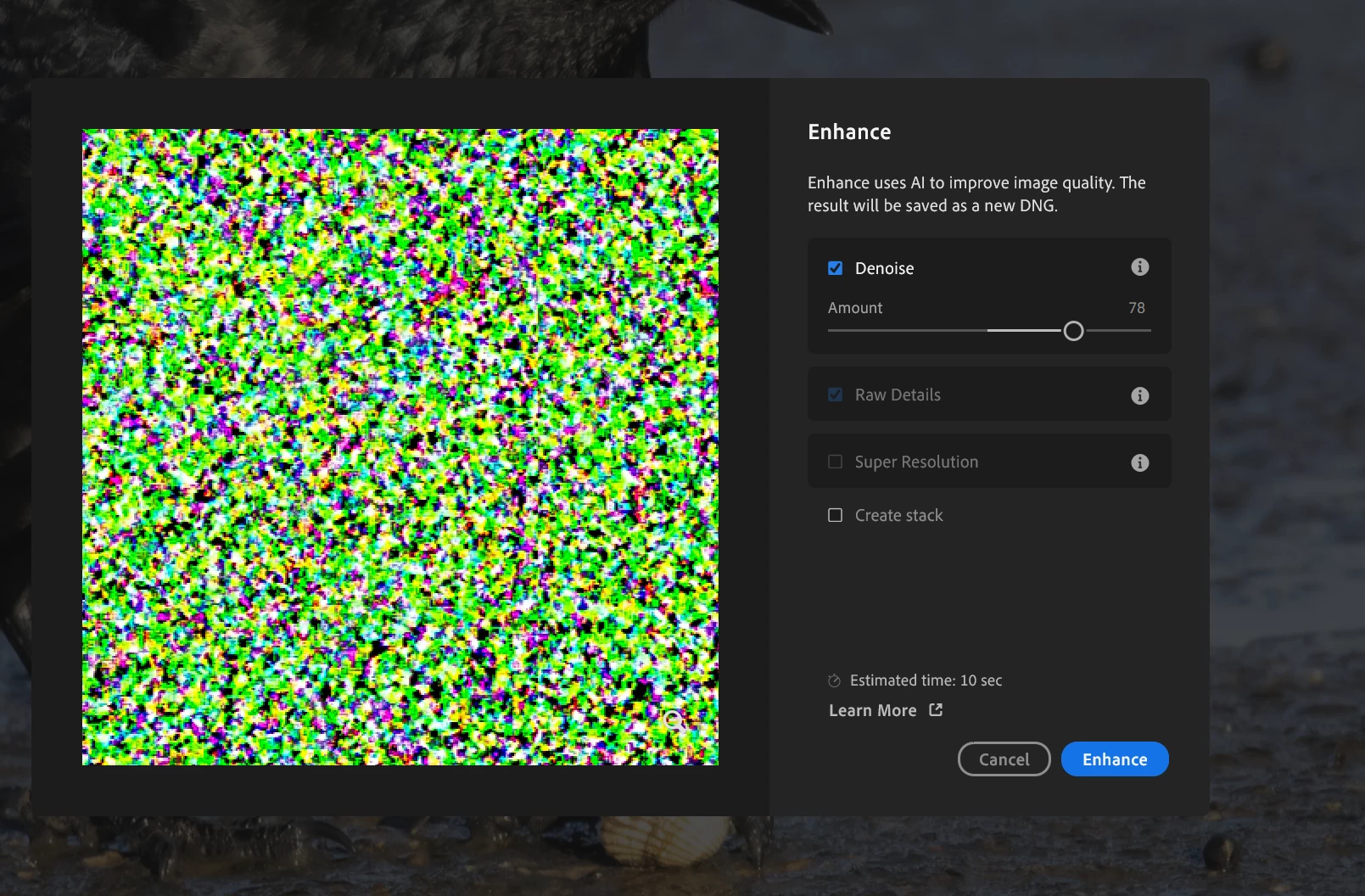
Denoise AI preview just noise

  • February 17, 2025
  • 1 reply
  • 231 views

Hi denoise with AI has been working fine but now only produces near random noise.  

Device name Desktop1
Processor 12th Gen Intel(R) Core(TM) i9-12900 2.40 GHz
Installed RAM 32.0 GB (31.7 GB usable)
System type 64-bit operating system, x64-based processor
8GB VRAM 

Only happened recently maybe (not quite sure) after recent software update
 

Correct answer Sameer K

Your machine has two GPUs: the power-saving Intel® UHD Graphics 770 and the high-performance Nvidia RTX 3080. The Nvidia GPU drivers are also dated. Check the conversation here & check the steps shared: https://adobe.ly/4beRF4F


If this does not help, head here to troubleshoot GPU issues: https://adobe.ly/3WNU2Wg.


Let me know how it goes. 

Thanks!
Sameer K

(Type '@' and type my name to mention me when you reply)

1 reply

Sameer K
Community Manager
Community Manager
February 18, 2025

Hey, @Paul L39. Welcome to the Lightroom Community. I'll need more info to help you figure this out.

Please share the system info from Lightroom Help > System info > Copy & paste into a text document > upload & attach here.


Test some variables like:

  • Unplug any external peripherals & use wired input devices.
  • Temporarily, unplug extra displays & only keep one active at a time. 

Head here to check if one of the errors matches what you see: https://adobe.ly/3VfIdHK


Let me know how it goes. Thanks! 
Sameer K

(Type '@' and type my name to mention me when you reply)

Paul L39Author
Participant
February 23, 2025

Thanks system info below.  As I say, was working fine till recently

cheers


Lightroom version: 8.2 x64 [ 20250201-0700-1b12095 ] (Feb 1 2025)
NGL Version: 1.39.0.9
WF Version: 7.2 963a5a9
VF Version: 1.0.154
HIL Version: 40501
CAI Version: adobe_c2pa/0.9.3 c2pa-rs/0.31.0
PH Version: 5.0

Operating system: Windows 11
OS Version: Windows 11 Home (2009)
Application architecture: x64
System architecture: x64
Computer model: HP HP ENVY All-in-One Desktop 34-c1xxx / 12th Gen Intel(R) Core(TM) i9-12900
Logical processor count: 24
Processor speed: 2.4 GHz
Real memory available to Lightroom: 32449.5 MB
Real memory used by Lightroom: 6350.3 MB (19.5%)
Virtual memory used by Lightroom: 13672.2 MB
Memory cache size: 4529.6 MB

Internal Camera Raw version: 17.2 [ 2155 ]
Maximum thread count used by Camera Raw: 13
Camera Raw SIMD optimization: SSE2,AVX,AVX2
Camera Raw virtual memory: 794MB / 14176MB (5%)
Camera Raw real memory: 779MB / 32449MB (2%)

Display: 5120x2160
System DPI setting: 144 DPI (high DPI mode)
Dark Mode: No
Desktop composition enabled: Yes
Input types: Multitouch: No, Integrated touch: No, Integrated pen: No, External touch: No, External pen: No, Keyboard: No

Graphics Processor Info: DirectX: NVIDIA GeForce RTX 3080 Laptop GPU (31.0.15.3640) - 8 GB
Graphics Processor Detail: loaded: Yes, supported: Yes, compute: Yes, init: I4_GPU4, hard: success, soft: success, al: Yes, dl: No
OS Media Capability: true

Application Folder: C:\Program Files\Adobe\Adobe Lightroom CC
Settings Folder: C:\Users\pjbcl\AppData\Roaming\Adobe\Lightroom CC
Library Folder: C:\Users\pjbcl\AppData\Local\Adobe\Lightroom CC\Data