


F. McLion
Community Expert
Community Expert
June 22, 2026
Answered

Detail view does not load

  • June 22, 2026
  • 3 replies
  • 34 views

Lr Mobile on Android does correctly show photos from Lr library in grid. When I open it, it does only show like this:
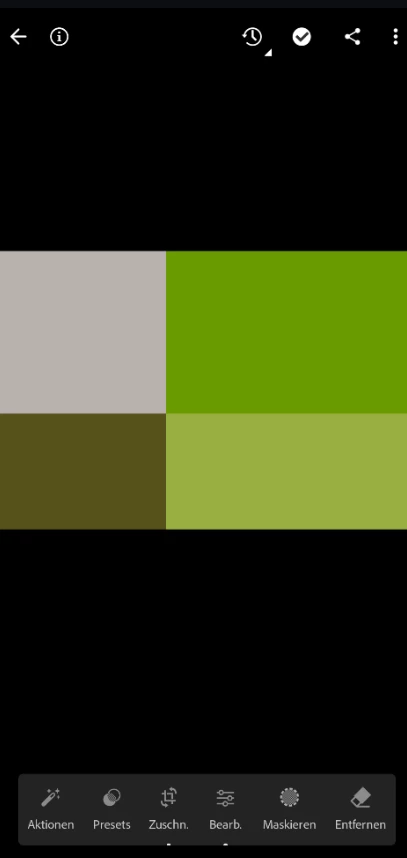


I see this on 2 phones while a third, old one does show it correctly.

Any ideas?

    Correct answer F. McLion

    The update published on June 25. fixes the issue on all my devices.

    3 replies

    F. McLion
    Community Expert
    F. McLionCommunity ExpertAuthorCorrect answer
    Community Expert
    June 26, 2026

    The update published on June 25. fixes the issue on all my devices.

    --- Got your issue resolved? Please label the response as 'Correct Answer' to help your fellow community members find a solution to similar problems. ---
    Chris5000
    Participant
    June 26, 2026

    I confirm that. Thank you! :) 

    Chris5000
    Participant
    June 23, 2026

    Seit dem Update meines Pixel 10 Pro XL auf Android 17 werden Fotos beim Öffnen oder Bearbeiten nur noch als grobes Raster mit farbigen Blöcken angezeigt. Die Fotoübersicht funktioniert normal. Bearbeitungen werden trotzdem gespeichert und sind auf anderen Geräten sichtbar, ebenso funktioniert die Cloud-Synchronisierung..

    Betrifft sowohl jpgs als auch raws, egal mit welchem Gerät aufgenommen. 


    Sameer K
    Community Manager
    Community Manager
    June 22, 2026

    Hey, @F. McLion. I'll work on this with you. I remember seeing a few posts with similar screenshots. Are these RAW files, or images shot on the mobile camera? Does this happen with newly imported images only, or with previously edited images too?


    Could you share a few sample DNG images that consistently show this behavior? Along with the sample images, could you share the specific device & the Android version you're working on?

    Does resetting edits help at all?


    Thanks!
    Sameer K
    (Type '@' and type my name to mention me when you reply)

    F. McLion
    Community Expert
    F. McLionCommunity ExpertAuthor
    Community Expert
    June 23, 2026

    Hi ​@Sameer K ,
    This are NEFs imported in Classic and then synced by collection - so on mob these are SmartPreviews.
    The images have been imported more than a year ago and as mentioned, it works on the old phone, but not the newer ones where Lr has been added shortly. 
    It showed this way with the version from last week and it still does with the update that came in like yesterday. It did never work on these newly added phones.
    When I first open the image in detail view it quickly shows, and then within a second it is replaced by what you see in the first post.
    If I open “versions” it does this fail no matter if I tap on the original or the modified.
    The pattern, however changes with the content of the image.

    Old working: Pixel 5, Android 14
    Not working: Pixel 10, Android 17
    Not working: Samsung Z-Fold 3, Android 16


    --- Got your issue resolved? Please label the response as 'Correct Answer' to help your fellow community members find a solution to similar problems. ---
    Sameer K
    Community Manager
    Community Manager
    June 23, 2026

    Thanks for adding the info. I couldn’t recreate this in my tests with a bunch of images uploaded from Lightroom Classic. Do these images have any specific edits?

    Could you share a few sample images and the diagnostic logs following the steps here: https://helpx.adobe.com/lightroom-cc/kb/generate-share-logs-lightroom-mobile.html 


    Thanks!
    Sameer K