


Participant
December 2, 2022
Question

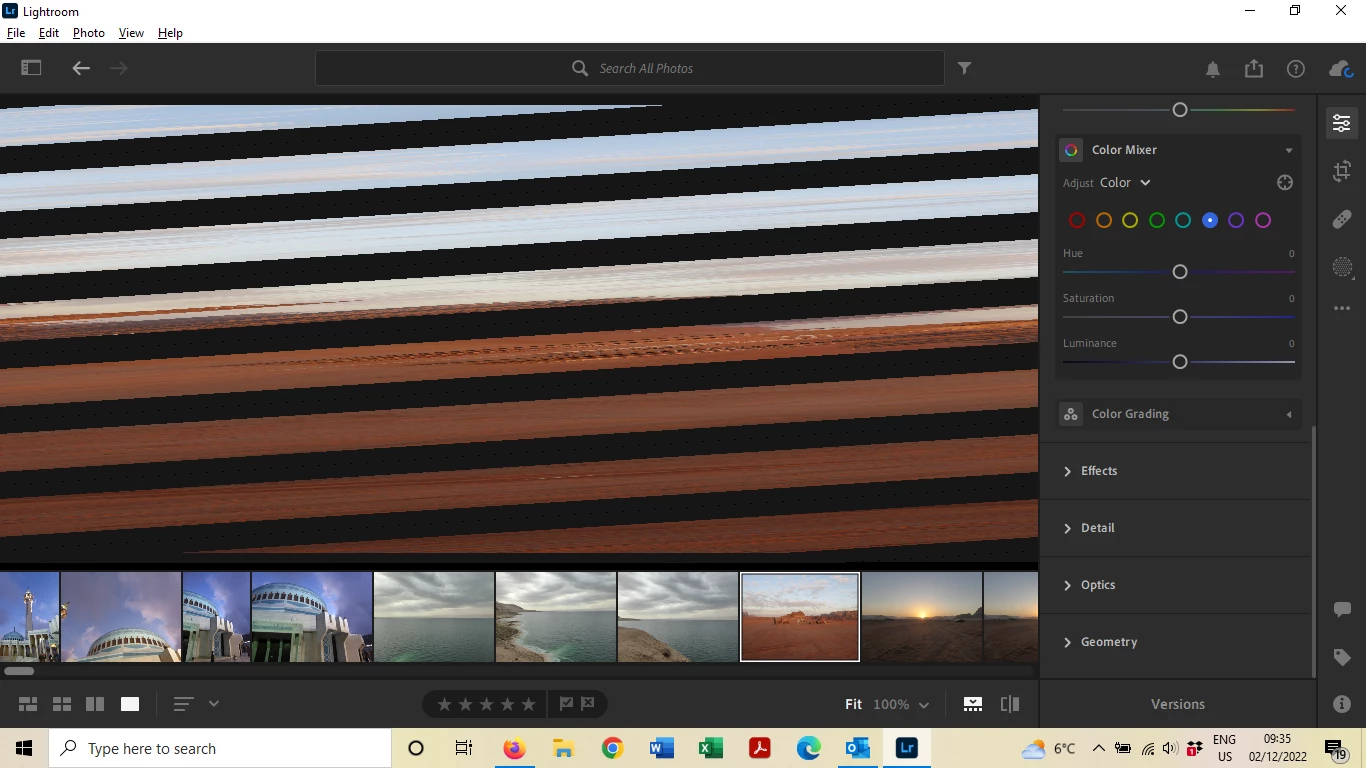
Diagonal lines appear on photos in edit screen

  • December 2, 2022
  • 1 reply
  • 530 views

Hi,

I recently started the free trial with LightRoom and each time I open a photo to edit it it appears with these diagonal lines and parts missing from the photos. The thumbnails and versions I open in the home screen appear normal. This happens with both my own photos and the ones that came with the software. I'm new to photo editing so any help apprciated.Thanks!
This topic has been closed for replies.

1 reply

Rikk Flohr_Photography
Community Manager
December 2, 2022

Greetings,


The two likeliest causes for this behavior are:

  1.  Out of date GPU Driver. Check with your video card manufacturer and install their latest update. If the problem persists you can disable the GPU in Preferences and see if functionality is restored to normal. If not:
  2. Data corruption of the files on disk is the next likeliest. Check for bad cards, cables, readers, hard disk or memory. 

    I suspect the GPU driver in this case. 

Rikk Flohr: Adobe Photography Org
Participant
December 2, 2022
Thanks so much for your help. I’ve updated my drivers and that’s fixed the problem 🙂

Sent from Outlook for iOS<>