Participant
October 18, 2022
Answered

Display images not in Albums?

  • October 18, 2022
  • 3 replies
  • 630 views

Is it possible to display all images which are not in albums

This topic has been closed for replies.
Correct answer Rob_Cullen

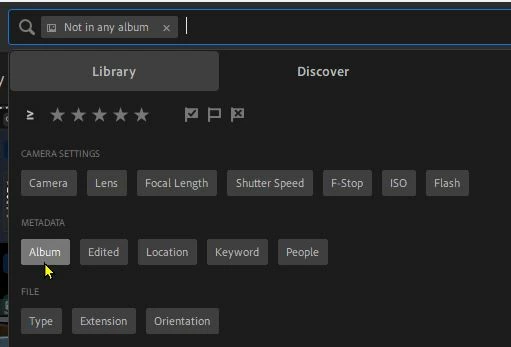
Yes. Click  in the Search box and select-[Album]

At the bottom of the Album list- choose [Not in any Album]


3 replies

Rikk Flohr_Photography
Community Manager
October 19, 2022

Into the search field, type "Not in any album"
Click on the token below the text

Rikk Flohr: Adobe Photography Org
Rob_Cullen
Community Expert
Rob_CullenCommunity ExpertCorrect answer
Community Expert
October 18, 2022

Yes. Click  in the Search box and select-[Album]

At the bottom of the Album list- choose [Not in any Album]


Regards. My System: Windows-11, Lightroom-Classic 15.3, Photoshop 27.5, ACR 18.3, Lightroom 9.3, Lr-iOS 10.4.0, Bridge 16.0.3 .
Participant
October 19, 2022

Thanks for your very quick reply Rob.

However, Im using the cloud version of Lightroom and not the Classic Version and unfortunately that option is not available that you mentioned.

Do you know a way of doing it in Lightroom (Cloud Version)

kglad
Community Expert
Community Expert
October 19, 2022

<moved again >

kglad
Community Expert
Community Expert
October 18, 2022

<moved from using the community >