
Participant
May 26, 2025
Answered

Edited photos overwritten by original unedited photos

  • May 26, 2025
  • 1 reply
  • 287 views

I copied all of my local photos to cloud, the bunch including some photos that I had previously imported to and edited in lightroom. After copying, in stead of there being two versions of these photos (the previously imported edited ones and the original unedited ones that I now imported), there were only the new unedited photos meaning that I lost all of the edits that I had made to the same photos previously. Does anyone know a way to restore the edited versions of the photos?
Correct answer Aleke

Hi @Petra_Mustonen3169
Thanks so much for sharing your steps! I gave it a try on my end, but so far I haven’t been able to reproduce the issue. For me, edits made on local files are copied to the cloud without any problems. Just to help narrow things down a bit — does this happen with all the photos you copy, or only with certain ones?

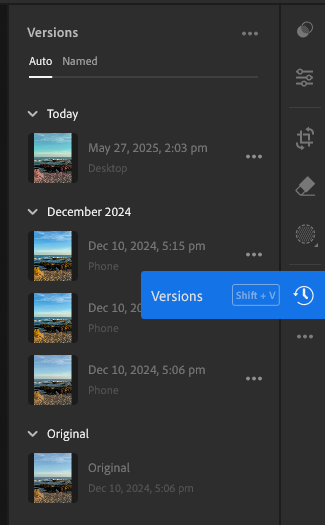
Also, when you check the Recently Edited section in the left menu, do your edited photos show up there? And if you open one of those photos and go to Versions, are you able to see the previous versions of your edits?

Really appreciate your help with this
Alek


1 reply

Community Manager
May 26, 2025

Hi @Petra_Mustonen3169, welcome to the community!
Could you tell me a bit more about what happened? I’d love to help figure this out with you. It would be helpful to know which version of Lightroom you’re using, how you copied your photos to the cloud, and whether you can see your edits when you log in to Lightroom Web.

Thanks so much!
Alek

*(If you mention me with an @, like @Aleke, I’ll get a notification and can respond faster.)*
Participant
May 27, 2025

Thank you so much for the fast reply @Aleke! I'm using Lightroom 8.3.1 and I copied the photos by selecting them in the lightroom app's local files section and clicking the option "copy to cloud". The edits are lost also in the web version of the app. Let me know if there's any other information that could help with finding a solution. Thank you for the help!

AlekeCommunity ManagerCorrect answer
Community Manager
May 27, 2025

Hi @Petra_Mustonen3169
Thanks so much for sharing your steps! I gave it a try on my end, but so far I haven’t been able to reproduce the issue. For me, edits made on local files are copied to the cloud without any problems. Just to help narrow things down a bit — does this happen with all the photos you copy, or only with certain ones?

Also, when you check the Recently Edited section in the left menu, do your edited photos show up there? And if you open one of those photos and go to Versions, are you able to see the previous versions of your edits?

Really appreciate your help with this
Alek


*(If you mention me with an @, like @Aleke, I’ll get a notification and can respond faster.)*