
Known Participant
October 26, 2019
Question

Editing source list

  • October 26, 2019
  • 1 reply
  • 183 views

Hi, is there a way to edit the source list in Lightroom CC? 

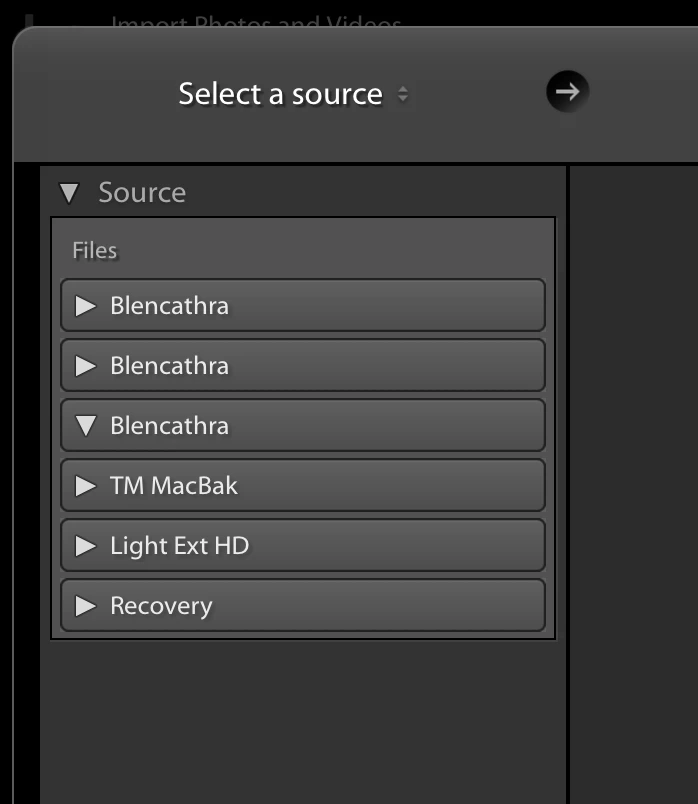
Re image below, the source list shows my hard drive 'Blencathra' 3 times, in the drop down 2 show the normal list of folders, one is blank.  How do I get this back to showing it once? 

Thanks
 

    This topic has been closed for replies.

    1 reply

    Jim Wilde
    Community Expert
    Community Expert
    October 27, 2019

    If you're using Catalina on a Mac, then you need to wait until Apple and/or Adobe figure this out. It seems to be related to the "hidden" partitions that Apple have introduced with the Catalina OS.


    If you're not using Catalina, then I don't really know why it would show 3 times, but there is no way to "edit" that list as far as I know. However, clarifying which version of Lightroom you are using would help. "Lightroom CC" is no longer a valid name for any of the current Lightroom apps, that screenshot you supplied is from the traditional desktop folder-based version, the latest of which is now known as Lightroom Classic. If you're using an older version, do Help>System Info to tell us the exact version that you are using.


    Known Participant
    October 27, 2019

    Hi Jim,

    I am using Catalina, thanks for the explanation, much appeciated.

    Rregards George