
pascalg44764113
Participating Frequently
October 14, 2025
Answered

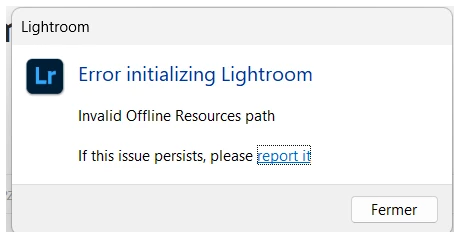
Erreur Lightroom
  • October 14, 2025
  • 1 reply
  • 133 views


Correct answer Anshul_Saini

Hi @pascalg44764113,


Thanks for sharing the details. The “Invalid Offline Resources path” error typically indicates that Lightroom (and sometimes other Creative Cloud apps) is unable to locate or access its required local resource path, often due to permission issues, missing folders, or a corrupted path configuration. I would suggest uninstalling Lightroom and Creative Cloud Desktop using the Creative Cloud Cleaner Tool. Then reinstall Creative Cloud and Lightroom.


Let us know how it goes.


Best,
Anshul Saini

1 reply

Community Manager
October 14, 2025

Hey @pascalg44764113, welcome to the community!
Could you let us know which version of Lightroom you're using and what operating system you're on? Also, are you working with a NAS setup by any chance?
If you haven’t already, try installing any pending Windows updates. If the issue persists, it would be super helpful if you could share some screenshots or even a screen recording of your workflow. You can upload the video here.
Thanks so much!
Alek

*(If you mention me with an @, like @Aleke, I’ll get a notification and can respond faster.)*
pascalg44764113
Participating Frequently
October 15, 2025
Bonjour

J'utilise Windows 11 famille, version à jour. Je n'utilise pas de NAS. 
Je ne parviens plus à accéder à Adobe Creative Cloud ainsi qu'à ma
formule incluant Photoshop, Photoshop Béta, Lightroom et Lightroom
Classic depuis trois jours (j'étais en vacances auparavant et ne
disposais pas de mon PC).

Photoshop v26.11 - Photoshop Beta v27.0.1 - Lightroom Classic v14.5.1 -
Lightroom v8.5.1

Lorsque j'essaie d'ouvrir Photoshop, voici ce que j'obtiens :

Lorsque j'essaie d'ouvrir Lightroom ou lightroom classic, voici ce que
j'obtiens :
Anshul_Saini
Community Manager
Anshul_SainiCommunity ManagerCorrect answer
Community Manager
October 28, 2025

Hi @pascalg44764113,


Thanks for sharing the details. The “Invalid Offline Resources path” error typically indicates that Lightroom (and sometimes other Creative Cloud apps) is unable to locate or access its required local resource path, often due to permission issues, missing folders, or a corrupted path configuration. I would suggest uninstalling Lightroom and Creative Cloud Desktop using the Creative Cloud Cleaner Tool. Then reinstall Creative Cloud and Lightroom.


Let us know how it goes.


Best,
Anshul Saini
