


Participant
January 15, 2023
Question

Error initializing Lightroom

  • January 15, 2023
  • 6 replies
  • 392 views

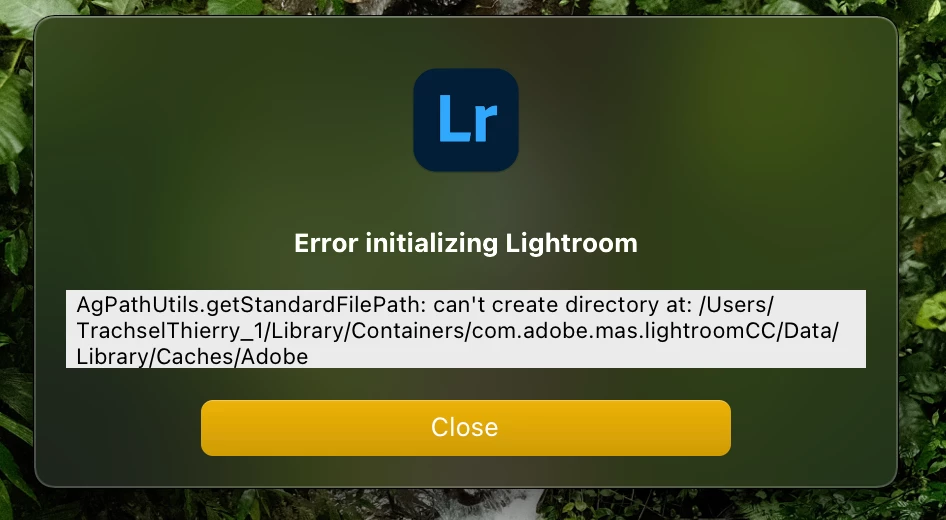
After I moved to a new macbook with Time machine, lighroom would not start ant the following message appears. Creative cloud seems to be working fine and I already reinstalled lightroom. Thx in advance for your help!


This topic has been closed for replies.

6 replies

Community Expert
February 1, 2023

If you also restored Lightroom itself using the Time Machine backup and you moved to a M1 machine then that is probably the issue. Doing this leaves a lot of crud around that prevents Lightroom from running even when you delete the local .lrlibrary copy. You should uninstall everything creative cloud related. This is easy to do with the creative cloud cleaner app that you can download from Adobe and then reinstall creative cloud, log in to your creative cloud account and then install Lightroom from there. 

JohanElzenga
Community Expert
Community Expert
January 16, 2023

The Lightroom Library.lrlibrary is just a cache. You can simply delete it and let Lightroom rebuild it.


-- Johan W. Elzenga
Participant
January 22, 2023

Thank you, this helped. But now the next error is appearing with the Information "Cameraw Raw can not be initialized". What do I do now?


JohanElzenga
Community Expert
Community Expert
January 22, 2023