
Participant
June 4, 2025
Answered

Export file naming templates for jpgs?

  • June 4, 2025
  • 1 reply
  • 192 views

I've searched for this and can't find an answer. I'm using Lightroom 8.3.1 on MacOS Land trying to export two batches of jpgs from raws in the cloud, one batch at print resolution and one for web. I can't figure out how to do any useful export naming to distinguish the two batches of files and keep which raw they came from. In DxO and CaptureOne I've been able to build templates like filename_print.jpg and filename_sm.jpg to distinguish the resolutions.


In Lightroom the "Custom" setting doesn't seem to inlude the filename with the custom text. All I can get it to do is "print1.jpg" "print2.jpg" and so forth. I must be missing something. Are there fields I can use in the "Custom" box to get normal custom names and if so where can I get a list of them?


Thanks
Correct answer Rob_Cullen

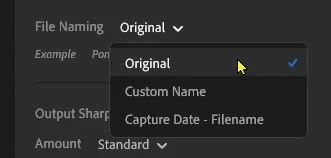
Lightroom does not have remane templates (as does Lightroom-Classic). You only have the three options-

'Custom Name' as you have discovered only allows the same Custom Text and a Sequence number for all images shared.


1 reply

Rob_Cullen
Community Expert
Rob_CullenCommunity ExpertCorrect answer
Community Expert
June 9, 2025

Lightroom does not have remane templates (as does Lightroom-Classic). You only have the three options-

'Custom Name' as you have discovered only allows the same Custom Text and a Sequence number for all images shared.


Regards. My System: Windows-11, Lightroom-Classic 15.1.1, Photoshop 27.3.1, ACR 18.1.1, Lightroom 9.0, Lr-iOS 10.4.0, Bridge 16.0.2 .
eethompAuthor
Participant
June 12, 2025

Thanks for the answer.


It's really disappointing that Adobe removed a  feature that has been standard in photography software for decades.