
Participant
Nov 12, 2026 6:21 AM UTC
Question

Extremely High CPU and GPU Usage in Lightroom on MacBook Pro M5 Pro

System Configuration

  • Computer: MacBook Pro with M5 Pro

  • CPU: 18-core M5 Pro

  • Operating System: macOS 27.2

  • Lightroom Version: 10.0 (latest version from the Mac App Store)

Issue Description

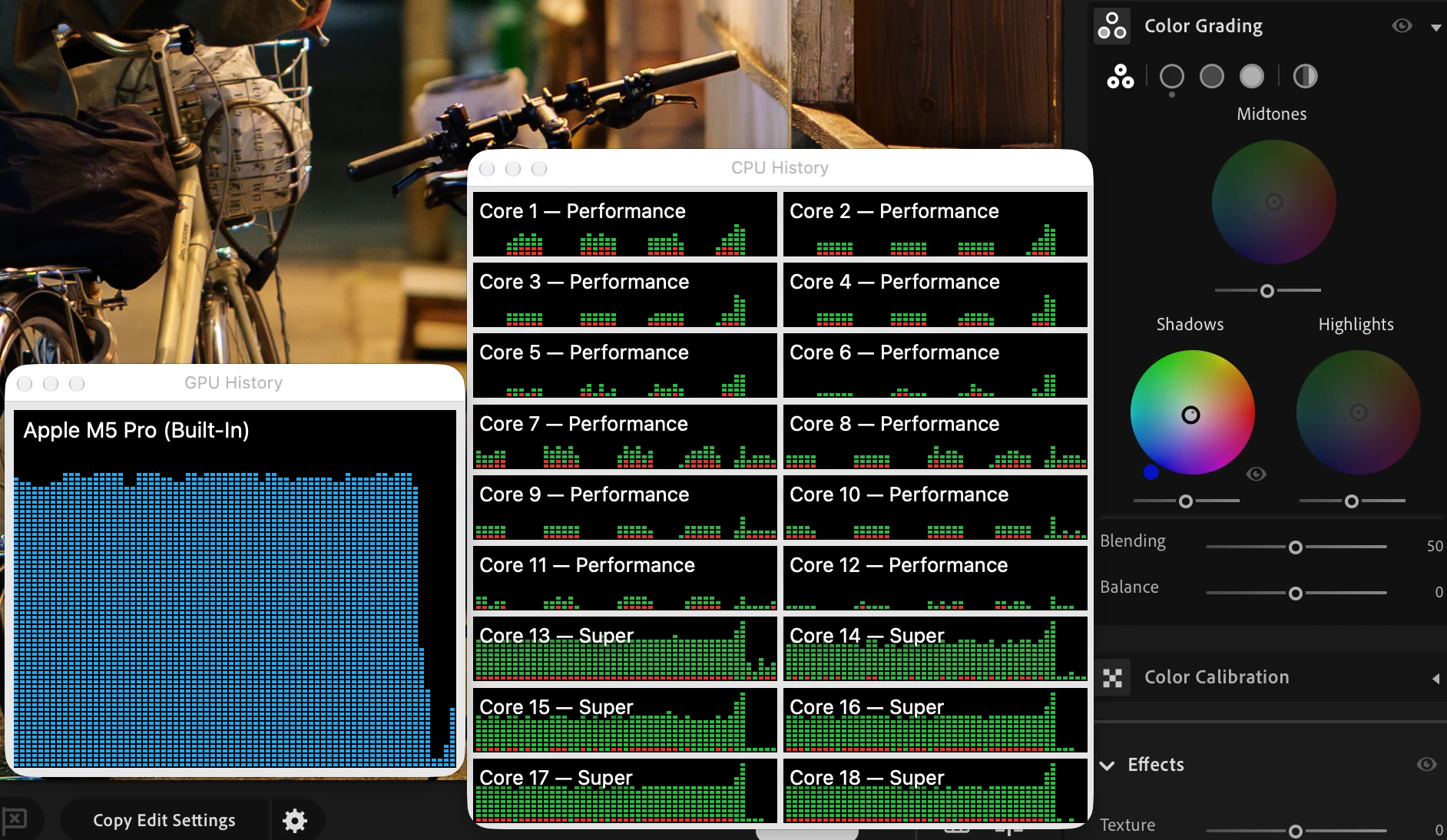
Lightroom exhibits abnormally high CPU and GPU usage on my MacBook Pro M5 Pro, even when performing very simple photo editing operations.

For example, when making basic adjustments using the Color Grading panel, CPU usage can become extremely high. According to macOS Activity Monitor, CPU usage can reach as high as 1300%. Given that the M5 Pro has 18 CPU cores (1800% representing full CPU utilization), this is an unusually heavy workload for such a simple editing operation.

GPU utilization is also consistently very high during these operations.

To rule out hardware-related performance limitations, I tested the same photos and editing operations on a Windows machine. Under the Windows environment, Lightroom's CPU usage remains below 5%. The difference is enormous.

Impact on Battery Life

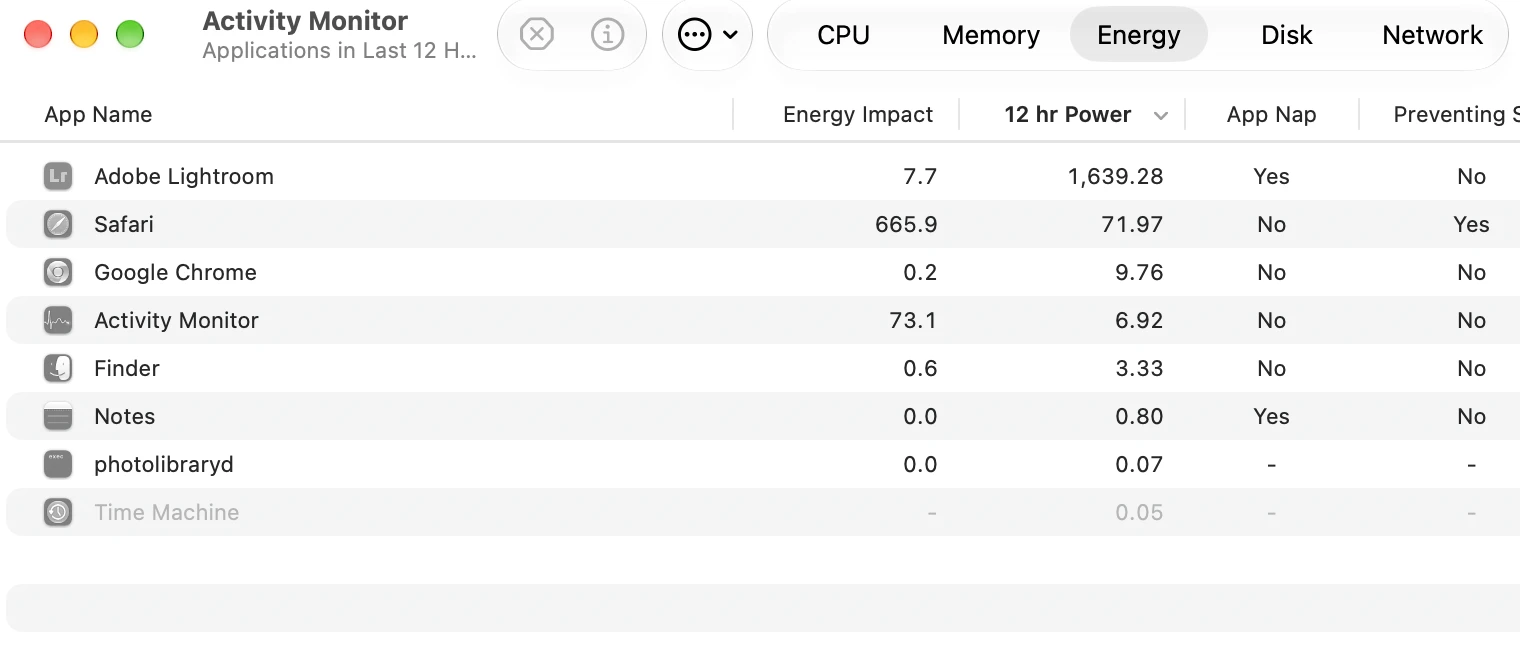
The excessive CPU and GPU usage has a significant impact on battery life. After approximately two hours of photo editing, my MacBook Pro loses nearly 50% of its battery charge.

This is extremely concerning, especially considering that I am performing relatively simple photo editing tasks rather than running demanding operations.

Troubleshooting Attempts

I have already tried the following:

  • Resetting Lightroom preferences to their default settings.

  • Completely uninstalling and reinstalling Lightroom.

Unfortunately, neither of these attempts resolved the issue.

Other applications on my MacBook Pro do not exhibit similar CPU or GPU usage problems, which makes this appear to be a Lightroom-specific issue rather than a general macOS or system-level problem.

Expected Behavior

Lightroom should not consume such an excessive amount of CPU and GPU resources when performing basic editing operations such as Color Grading.

I would appreciate it if the Lightroom development team could investigate whether there is a performance or resource-management issue specific to the Apple Silicon version of Lightroom, particularly on the M5 Pro.
 

    2 replies

    Sameer K
    Community Manager
    Community Manager
    Nov 12, 2026 10:53 AM UTC

    Hey, @neutrinoo334. Welcome to the Lightroom Community. I’ll help you figure this out.


    Has this started happening since a recent Lightroom release? Have you installed Lightroom from the Creative Cloud desktop app or via the Mac App Store? Was Lightroom working on this machine before you updated to macOS 27.2?


    Try these steps to get Lightroom to launch:

    • Reset Lightroom by holding OPT + SHIFT when you launch Lightroom and select 'Yes'.

    • Ensure Lightroom has the required permissions on macOS: https://adobe.ly/3DyUwsz


    If this does not help at all, please share a Sample Process log from the Activity Monitor on macOS. It is recommended that you try creating the Sample Process closer to when Lightroom starts to take abnormal amounts of resources.


    Follow the steps here, or as mentioned below: https://adobe.ly/4zC1wNm

    1. Open Activity Monitor

    2. Launch Lightroom

    3. Select Lightroom in Activity Monitor

    4. Select “Sample Process”. In the Activity Monitor’s Menu bar, select View -> Sample Process


    Save the file and send it to us here, or via direct message from my profile.


    Thanks!
    Sameer K
    (Type '@' and type my name to mention me when you reply)

    Translate
    Participant
    Nov 13, 2026 5:02 PM UTC

    ​@Sameer K 

    Hi Sameer,

    Thank you for your response.

    Regarding your questions:

    • When did the issue start? I purchased this MacBook Pro approximately two months ago, so I don't have enough historical information to determine whether the issue was introduced by a specific Lightroom release or macOS update. However, I believe the excessive battery consumption has been present since I first started using this machine.

    • Where was Lightroom installed from? I installed Lightroom through the Mac App Store.

    • Was Lightroom working properly before updating to macOS 27.2? Unfortunately, I cannot confirm this, as I purchased the computer relatively recently and don't have enough experience with previous macOS versions on this machine.

    I have also tried all the suggested troubleshooting steps, including:

    • Resetting Lightroom using OPT + SHIFT during startup.

    • Checking and verifying Lightroom's required macOS permissions.

    • Resetting Lightroom preferences.

    • Uninstalling and reinstalling Lightroom.

    Unfortunately, none of these steps resolved the issue. The abnormally high CPU and GPU usage still persists.

    I have successfully captured a Sample Process log using Activity Monitor while Lightroom was consuming an unusually high amount of system resources. I have saved the log as a .txt file and attached it to this reply for your team to investigate.

    Hopefully, the log will help identify the underlying cause of this issue.

    Please let me know if you need any additional information or diagnostic files.

    Thank you for your help.

    Best regards

    Translate