


Participant
October 31, 2022
Question

Failed to load development version error message in Lightroom Mobile images (Android)

  • October 31, 2022
  • 1 reply
  • 165 views

Hello, this morning I have discovered that all the photos, except the one I imported on Lightroom last night, cannot be accessed in my Lightroom app. They've been showing as this grey squares, and whenever I try to click on them it says "Failed to load development version". But its stated that it still have 413 photos (the ones now missing). I tried to sign out and sign in multiple times, even restarted my phone, but nothing works. 


Even on my phone Gallery, Google Photos, and Recycle Bin, everything from I exported from Adobe Lightroom is gone.
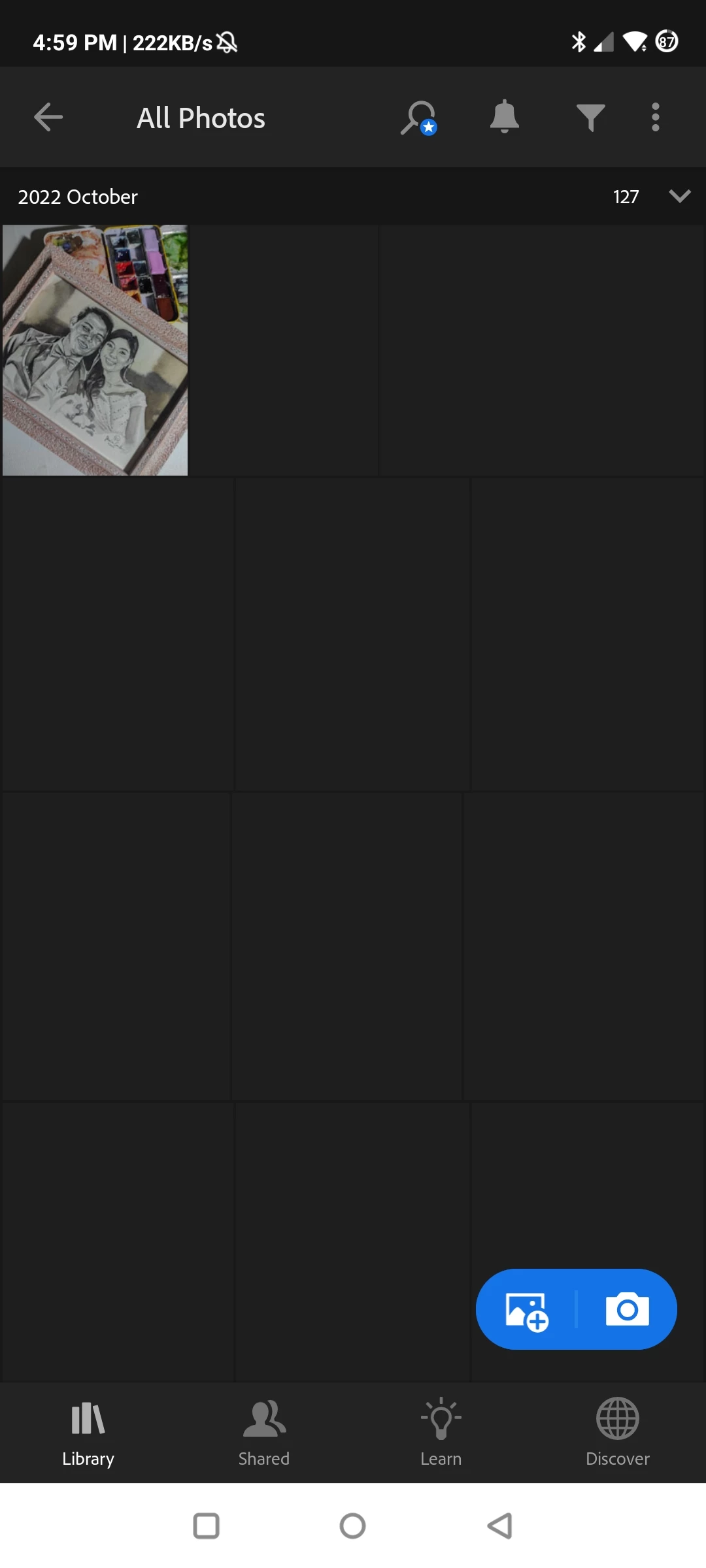


{Title edited by Moderator}

This topic has been closed for replies.

1 reply

Ranjisha Sengupta
Legend
November 2, 2022

Hi there,

Thanks for reaching out.

Could you please let us know the exact version of Lightroom mobile CC installed on your device? Also, make sure you log in with the subscribed email address. Where are the images located?

Would you mind checking this discussion on our forum: https://community.adobe.com/t5/lightroom-ecosystem-cloud-based-discussions/failed-to-load-development-version-in-lr-mobile/td-p/9909265


You may try signing out & signing back in from the Lightroom mobile CC app and check if that helps.


Regards,

Ranjisha