Laur-Kalevi Tamm
Participating Frequently
May 2, 2019 5:12 PM UTC
Answered

From Apple Aperture to Adobe Creative Cloud

Hi, There!

As Apple Aperture will not run on OS after 10.14, I have to come over here. I’m very new here and not familiar with Adobe editing tools at all.

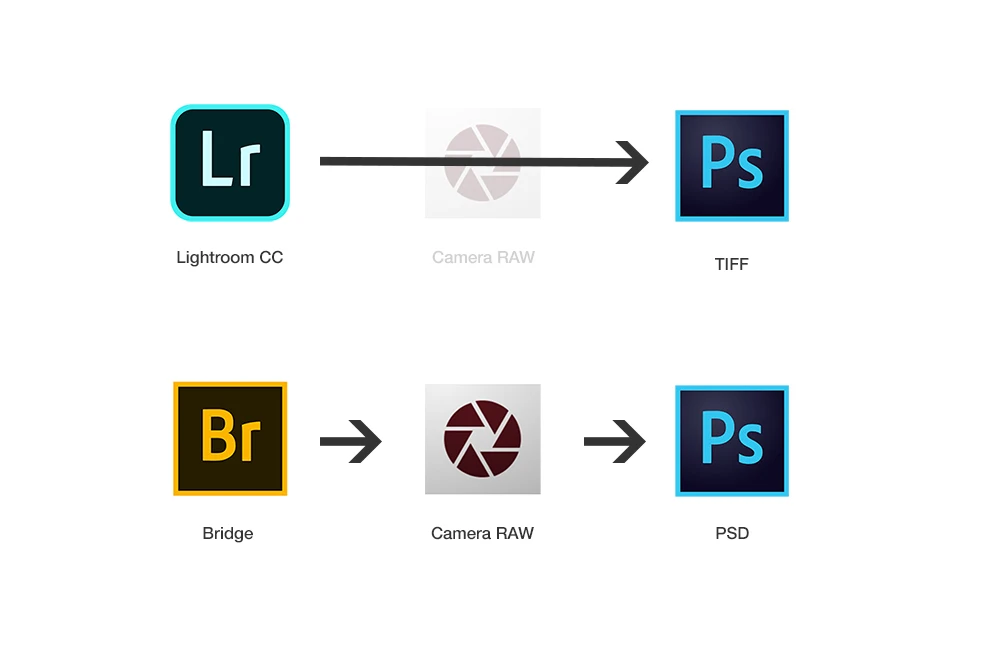
I have tested Adobe Creative Cloud photo storage and editing options, via Lightroom CC (library storage) and via Bridge (files storage). Both options allow further editing with Photoshop, but via Lightroom CC it skips Camera RAW and opening photo in TIFF format (not in PSD). I can’t figure out why so?

Thanks,

Kalevi
    This topic is closed to new replies. Start a new post to keep the conversation going.
    Theresa J
    Theresa JCorrect answer
    Community Expert
    May 3, 2019 3:03 AM UTC

    First, it’s really important to understand the Lightroom CC is CLOUD storage, not library storage. If you want to manage your files on a hard drive you should use Lightroom Classic, not Lightroom CC.

    Second, Lightroom (both CC and Classic) have an editing engine built into the application. It’s like having Camera RAW built in. That’s why there is no need to go to Camera RAW before Photoshop. Adobe Bridge is a viewer for your hard drives. It doesn’t edit images, it just looks at them. That’s why your raw files go into Camera RAW before going to Photoshop, so that you can edit the raw data first.

    4 replies

    Theresa J
    Community Expert
    Theresa JCommunity ExpertCorrect answer
    Community Expert
    May 3, 2019 3:03 AM UTC

    First, it’s really important to understand the Lightroom CC is CLOUD storage, not library storage. If you want to manage your files on a hard drive you should use Lightroom Classic, not Lightroom CC.

    Second, Lightroom (both CC and Classic) have an editing engine built into the application. It’s like having Camera RAW built in. That’s why there is no need to go to Camera RAW before Photoshop. Adobe Bridge is a viewer for your hard drives. It doesn’t edit images, it just looks at them. That’s why your raw files go into Camera RAW before going to Photoshop, so that you can edit the raw data first.

    Translate
    Laur-Kalevi Tamm
    Participating Frequently
    May 3, 2019 7:14 AM UTC

    Hi, Theresa J!​

    Thank you for the clarification!

    I prefer Cloud storage and as possible similar organizational capabilities and quick edit features which were Aperture.

    Lightroom CC has similarity to Aperture, but in some point it looks I need further editing with Photoshop, unfortunately, it opens in TIFF format, why?

    Kalevi

    Translate
    99jon
    Legend
    May 3, 2019 1:32 PM UTC

    Lightroom Classic lets you specify PSD in preferences.

    Once in PS you can use Camera Raw from the Filter menu. If you first convert to a smart object you can also repeatedly return to camera raw to tweak your slider/edit settings.

    Translate
    kglad
    Community Expert
    Community Expert
    May 3, 2019 12:13 AM UTC