Participating Frequently
May 7, 2026
Answered

Gallery "right click" menu pops up below images rather than above it

  • May 7, 2026
  • 3 replies
  • 60 views

I’m looking through “all photos” scrolling side to side. Right clicking after selecting single or multiple photos pops up the right-click menu with the option to scroll DOWN to see all options. Why would i do that? That’s the bottom of my screen.
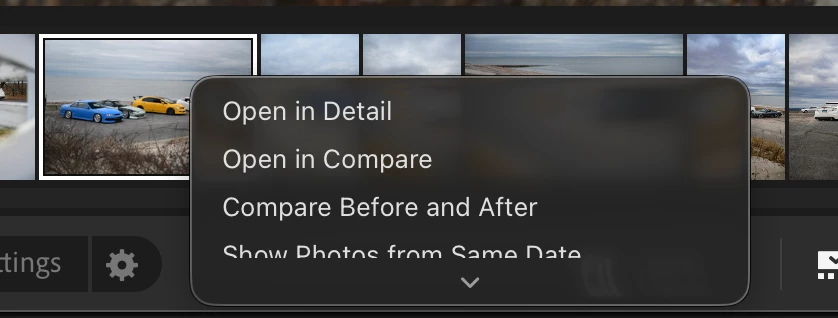
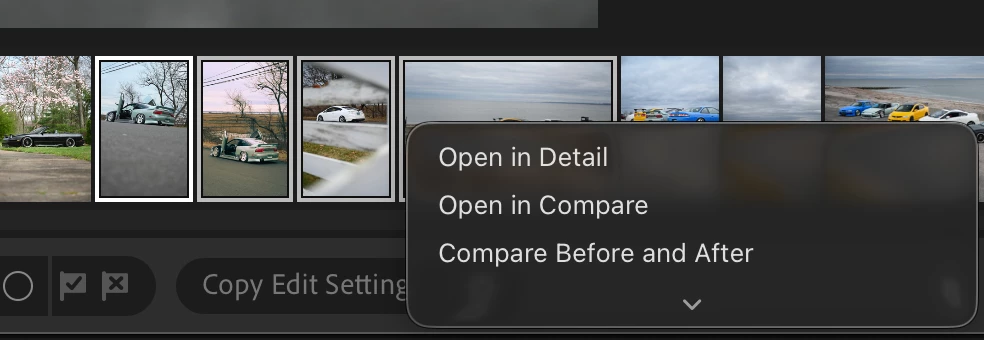
Why doesn’t the menu pop UPWARDS and display all options? 

    Correct answer Sameer K

    Hey, ​@thermogod. Thanks for bringing this up. I’ll help you figure this out. 

    Try resizing the film strip to make it shorter, and the menu should extend fully. 


    Let me know if this helps. 

    Thanks!
    Sameer K

    3 replies

    Sameer K
    Community Manager
    Sameer KCommunity ManagerCorrect answer
    Community Manager
    May 28, 2026

    Hey, ​@thermogod. Thanks for bringing this up. I’ll help you figure this out. 

    Try resizing the film strip to make it shorter, and the menu should extend fully. 


    Let me know if this helps. 

    Thanks!
    Sameer K

    thermogodAuthor
    Participating Frequently
    June 1, 2026

    thank you Sameer, that did work but only when the filmstrip is at or close to its smallest possible size. 

    the smallest possible size doesn’t work for me; i need to be able to clearly see each picture so i know which to click when i’m in “Compare” mode (i.e. i have multiple very similar pictures on Lightroom and I want one and not the other, i can’t really tell which is which when the filmstrip is incredibly small).

    i’m sure this is not the intended behavior of the right-click menu, i would hope Adobe would make it open above the filmstrip rather than below, no matter what...


    thermogodAuthor
    Participating Frequently
    May 15, 2026

    LR version 9.3.1 on Mac OS 26.4. 


    this continues happening btw. no explanation, no solution, it’s very good that a company the size of Adobe can push updates to Lightroom and completely bugger it. 

    along with general slowness and an inability to export without being hung up on “preparing...”, which, when googling, seems to be a problem that 20+ other people have had. 

    this is great - paid four figures for a mac with an M4 Pro and basic masking and exporting in lightroom is apparently completely beyond it. 

    Jim Wilde
    Community Expert
    Community Expert
    May 8, 2026

    That’s curious. This is how it looks on my system:


    Which appears to be exactly how you want it to work. What version of LrD are you using, and what OS platform - Mac or Windows? I’m using version 9.3 on MacOS 26.3.