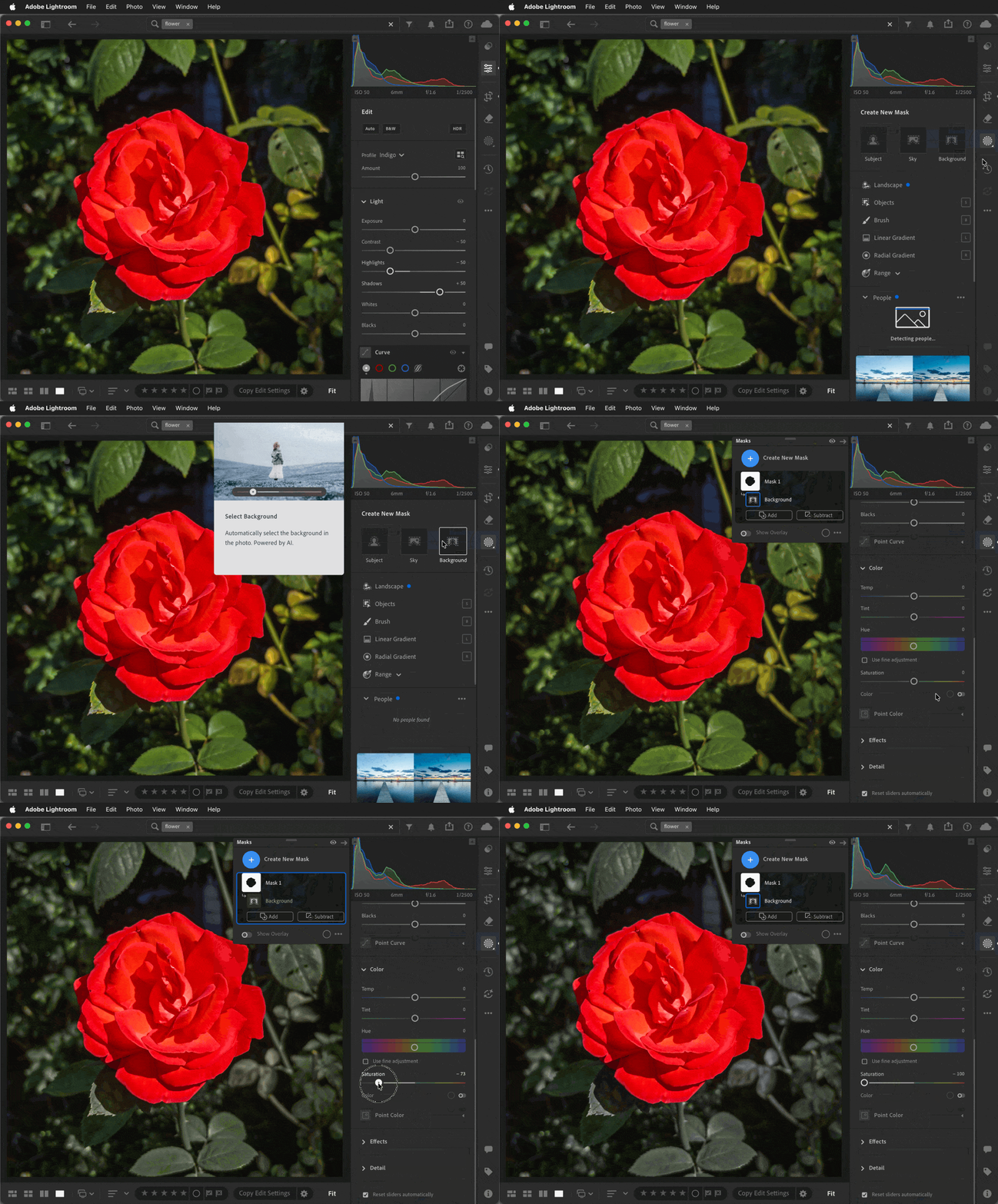
If the subject is prominent, Lightroom might be able to isolate it in one click using a Background mask. Here are the steps for the demo below, which only takes a few seconds:
Switch to Masking.
Click the Background button. That creates a mask that identifies the subject, then selects everything except the detected subject.
In the Color controls for that background mask, reduce Saturation. When Saturation is -100, the background will be black and white.
If the subject is not properly detected by the automatic Background mask, try masking your subject using Object Selection or any other combination of masking tools that can isolate it quickly. Then invert that mask and continue with step 3.
If there are any pieces that you want to remain colored, simply Subtract them from the background mask. For example, if I wanted the flower’s stem to stay green, I’d click the Subtract button for the background mask and try creating an Object selection sub-mask to select the stem for the subtraction.
If the subject is prominent, Lightroom might be able to isolate it in one click using a Background mask. Here are the steps for the demo below, which only takes a few seconds:
Switch to Masking.
Click the Background button. That creates a mask that identifies the subject, then selects everything except the detected subject.
In the Color controls for that background mask, reduce Saturation. When Saturation is -100, the background will be black and white.
If the subject is not properly detected by the automatic Background mask, try masking your subject using Object Selection or any other combination of masking tools that can isolate it quickly. Then invert that mask and continue with step 3.
If there are any pieces that you want to remain colored, simply Subtract them from the background mask. For example, if I wanted the flower’s stem to stay green, I’d click the Subtract button for the background mask and try creating an Object selection sub-mask to select the stem for the subtraction.
One ‘old’ method is to use Saturation sliders in the Color Mixer to affect colors globally. You can use masking to be more precise with selected areas. (eg. Select ‘Subject’ or a ‘Color Range’, invert mask, desaturate.)
If you convert the image to B&W by toggling the [B&W] button and use a mask, you will only have a ‘Tint’ option in the Color panel.




 AdChoices