

Morgan37522035s2jn
Participant
April 15, 2026
Question

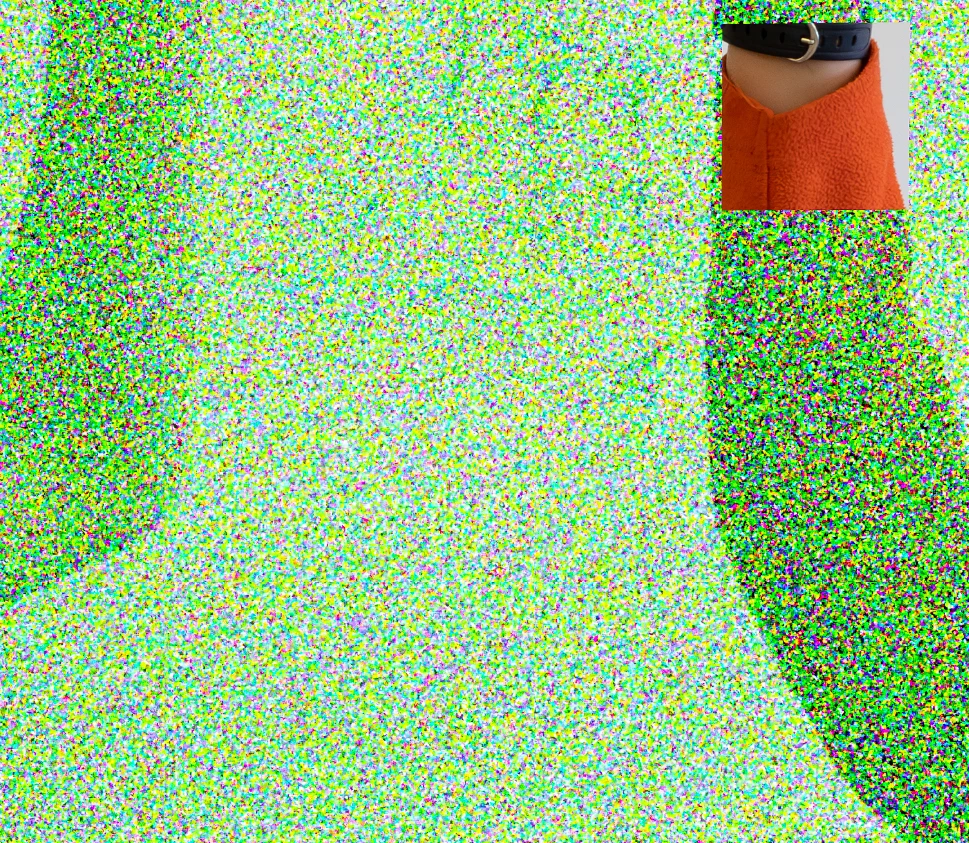
Green/yellow noise shows up when I run denoise - except on a few small square areas of the photos.

  • April 15, 2026
  • 1 reply
  • 39 views

I'm not sure what is happening. I've tried to run denoise on a few photos, they all turn out like this. That one little square that isn't green still changes if I use other editing sliders. It's like the denoise worked on a couple areas and turned everything else into green disco snow.

I'm on windows, using Lightroom 9.2, x64

Things I have tried:

Windows is up to date

GPU Drivers are up to date

Have restarted Lightroom

Exporting the photo retains the green, so it's not just a visual glitch

Happens with multiple photos
 

    1 reply

    CMass
    Community Manager
    Community Manager
    April 15, 2026

    Hey @Morgan37522035s2jn,

    Thank you for sharing a screenshot of the issue as well of some of your system information. May I ask that you share a more in depth System Info report? You can find this by going to Help > System Info? Copy any paste everything into a text file ant attach to your response.

    Thank you!


    ^CMass

    Morgan37522035s2jn
    Participant
    April 16, 2026

    I’m using a Dell laptop.
    Processor:13th Gen Intel(R) Core(TM) i9-13900H   2.60 GHz
    Ram: 64 GB
    OS: Windows 11 Enterprise
    GPU: 8 GB, Intel Iris Xe

    nik.m
    Community Manager
    Community Manager
    April 24, 2026

    Thanks for sharing the information and we’re sorry about the delay in responding to you! 

    Try disabling the GPU from Lightroom by going to Preferences, then Performance. Once done, relaunch the app and let us know how it goes. 


    Thanks, 

    Nikunj