
Question
HDR Export Color Drift
Setup
- Lr Classic 13.0.1 for macOS, Mac Studio; Lr for iPad 9.0.0 8AFC9B/112, iPad Pro 12.9 with XDR display
- Original files on mac, used collection sync to edit on iPad Pro
Expectation
- Exported AVIF (or any HDR-ready format supported by Lr) should look identical to the edits previewed on Lr on iPad Pro.
Actual Results
- Exposure not consistent with the Lr edit preview on iPad Pro
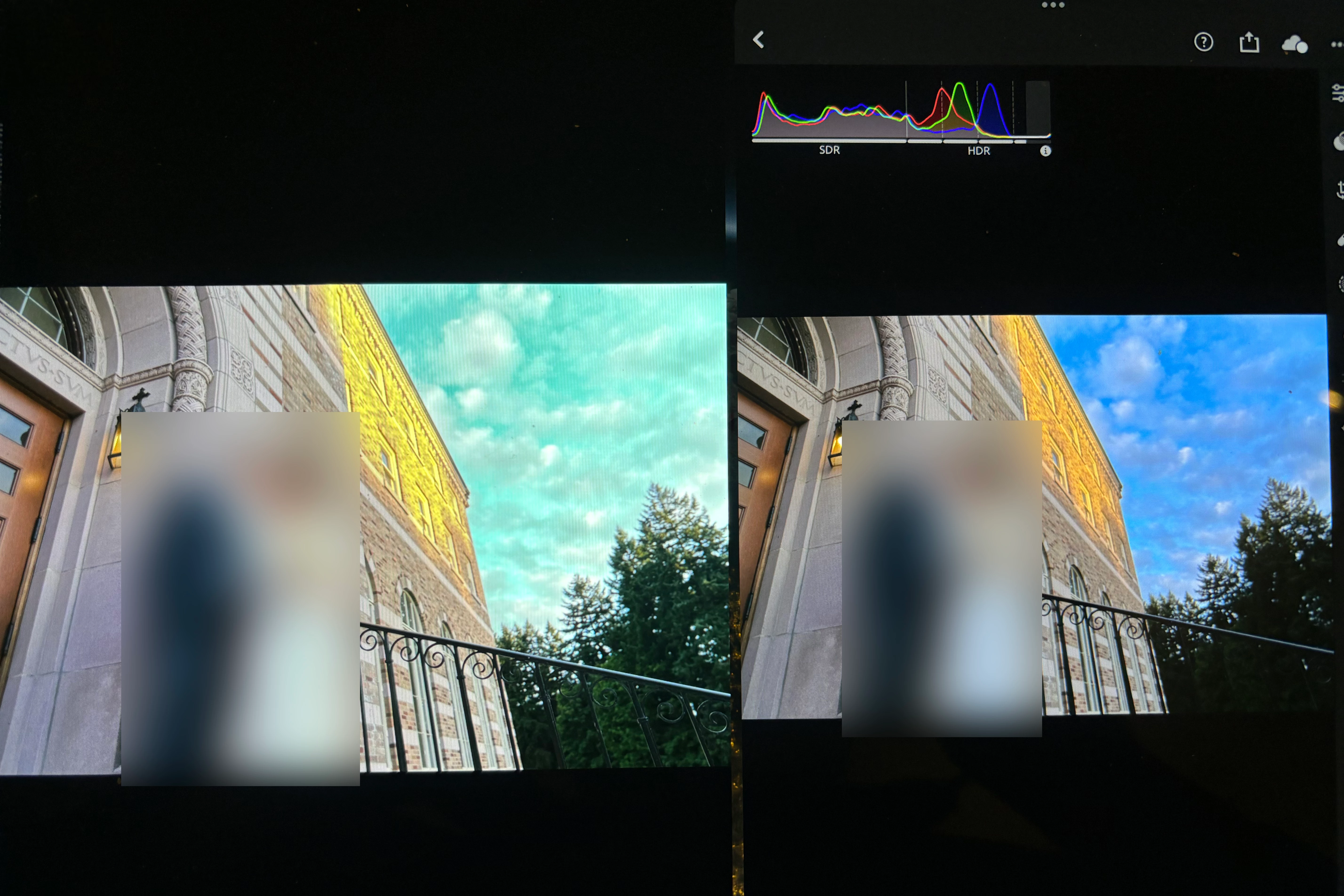
- Color drift—you can see the sky in Lr was correct in blue, the exported AVIF viewed on the same iPad Pro showed a lot of cyan
Attached file is the photo I took of my iPad Pro, on the left is the AVIF exported from Lr, viewed using the Photos app; on the right is the edit preview in Lr. They were displayed on the iPad simultaneously using iPad's Stage Manager multiple task feature.
Please advise how to make the export true to the edit, or if Photos app is not ready for AVIF, please recommend me proper app to view HDR AVIF.
Thanks.


 AdChoices