Participant
January 1, 2021
Answered

Help - Radial Gradient in Lightroom isn't working properly

  • January 1, 2021
  • 1 reply
  • 512 views

The tutorial online shows the woman places the radial gradient (oval shaped) over a subject and it makes everything around the subject darker. 


When I attempt using the same tool the exact same way it does the opposite. It makes the oval shape but instead of making everything around the subject darker it makes it lighter and their is a dark oval shadow over the subject.


Does anyone know how to reverse this?

This topic has been closed for replies.
Correct answer Rob_Cullen

In Lightroom-Desktop (v4.1) you have the [Invert] box-

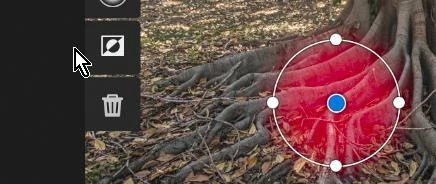
In Lightroom-Mobile v6.1.0 (on iPhone) you have the 'Dark side of the moon' icon to Invert-


1 reply

Rob_Cullen
Community Expert
Rob_CullenCommunity ExpertCorrect answer
Community Expert
January 2, 2021

In Lightroom-Desktop (v4.1) you have the [Invert] box-

In Lightroom-Mobile v6.1.0 (on iPhone) you have the 'Dark side of the moon' icon to Invert-


Regards. My System: Windows-11, Lightroom-Classic 15.1.1, Photoshop 27.3.1, ACR 18.1.1, Lightroom 9.0, Lr-iOS 10.4.0, Bridge 16.0.2 .