


Help with transfering files to a new hard drive
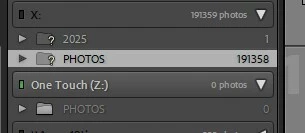
I was close to running out of space on my hard drive (“X”) so I transferred > 190,000 photos and the Lightroom Classic to a new hard drive, which has a different letter (“Z”). I did this using Windows Explorer instead of within Lightroom as I understood it was quicker and more reliable to use this approach. I then disconnected the old hard drive (“X”) to ensure all access to Lightroom was via the new hard drive. I am able to open the catalog in Lightroom but the folder structure does not appear. The Photos folder is on the hard drive but I can’t get the software to recognize it. It is my understanding that I shoud not use “synchronize” since I would lose all past edits. Is that correct? I also read about using the “Find the Folder” function but I don’t see that option anywhere.
How can I get Lightroom Classic to recognize the photos that are stored on the hard drive and hopefully not lose the edits that are already incorporated in the catalog?
 AdChoices