
Question
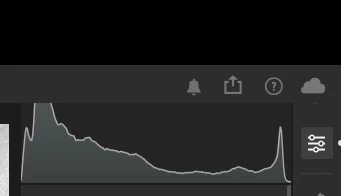
Histogram is cut off after switching users (macOS)
I haven't tested all the variables here so I'll just give the exact steps that allow me to reproduce the issue, but some things (like specifically using fast user switching) may not be necessary.
- Set up two user accounts
- Enable Touch ID on both accounts, using different fingers
- Make sure "Use Touch ID for fast user switching" is enabled on both accounts
- Make sure both accounts have been logged in to since last booting the system
- Launch Lightroom on either account
- Set the Lightroom window to fullscreen (🌐F / ⌃⌘F)
- Open any photo
- Open the edit panel and ensure the histogram is enabled (⌘0)
- Using fast user switching, switch to the other active user account
- Using fast user switching, switch back to the account with Lightroom open
Upon switching back, the Lightroom window will briefly reset its positioning, and in the process, position the histogram too high, causing the top section of it to be cut off:


 AdChoices