
Inspiring
December 5, 2020
Question

how import cube file into new ACR 13

  • December 5, 2020
  • 1 reply
  • 555 views

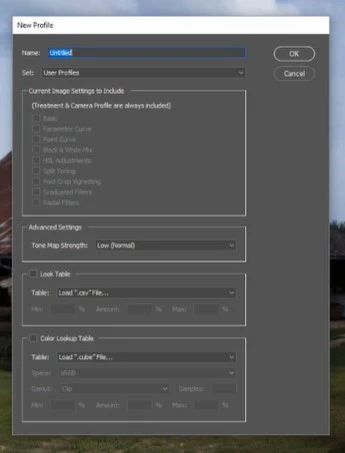
In the old version when making a new profile in ACR it was possible to inport a cube file - color lookup table (cube file or LUT). How do I do that in the new version 13? The menu is completely different. 
 

This topic has been closed for replies.

1 reply

Shangara Singh
Inspiring
December 7, 2023

The option is still there!

  1. Select the Color Lookup Table checkbox
  2. Navigate to the cube file
  3. Name it
  4. Choose or create the group in which you want to list the XMP
  5. Deselect Basic (it is in your screenshot, but is selected for me everytime I open the New Profile box)
Shangara SINGH.