
Nature Mike
Known Participant
March 3, 2020
Answered

How to export photos from LR to LR Classic

  • March 3, 2020
  • 2 replies
  • 612 views

Hello,


I'm a long time LR Classic user but I have only opened LR mobile a few times. I want toi know if there is any way to export an entire LR moblie catalog that way it can be used in LR Classic insted. i know I can export the photos as original file type but I was wondering if there is any sort of Export catalog option like there is in LR Classic.


Any thought are grratly appreciated. 


Thanks


- Mike
This topic has been closed for replies.
Correct answer Rob_Cullen

If you turn on 'Sync' in Lightroom-Classic, it should simply download all the Lightroom (mobile) files to a local folder and show in the Classic catalog. Export is not needed!


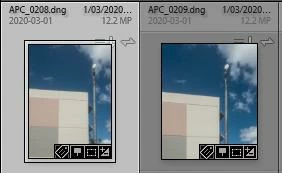
eg. So I took these photos on my iPhone Lightroom camera on March 1st, and here they are in my desktop Classic catalog, downloaded to a 'dated' folder I specified in {Preferences/Lightroom Sync}, ready to edit, etc.

2 replies

Theresa J
Community Expert
Community Expert
March 4, 2020

You don't need to do it that way. Turn on the sync in Lightroom Classic and everything from Lightroom will automatically download to your computer. Here's the help page for Lightroom Classic sync. https://helpx.adobe.com/lightroom-classic/help/lightroom-mobile-desktop-features.html This page explains how to sync from Classic to Lightroom with Collections, and how to receive photos from Lightroom into Classic. 

Nature Mike
Known Participant
March 6, 2020

Thanks for the info!

Rob_Cullen
Community Expert
Rob_CullenCommunity ExpertCorrect answer
Community Expert
March 3, 2020

If you turn on 'Sync' in Lightroom-Classic, it should simply download all the Lightroom (mobile) files to a local folder and show in the Classic catalog. Export is not needed!


eg. So I took these photos on my iPhone Lightroom camera on March 1st, and here they are in my desktop Classic catalog, downloaded to a 'dated' folder I specified in {Preferences/Lightroom Sync}, ready to edit, etc.

Regards. My System: Windows-11, Lightroom-Classic 15.1.1, Photoshop 27.3.1, ACR 18.1.1, Lightroom 9.0, Lr-iOS 10.4.0, Bridge 16.0.2 .
Nature Mike
Known Participant
March 6, 2020

Thanks for the insight!