

Driftwoodfoto
Participant
March 22, 2026
Question

How to fix colors shifting from original location when import dng to LR on iPhone?

  • March 22, 2026
  • 1 reply
  • 16 views

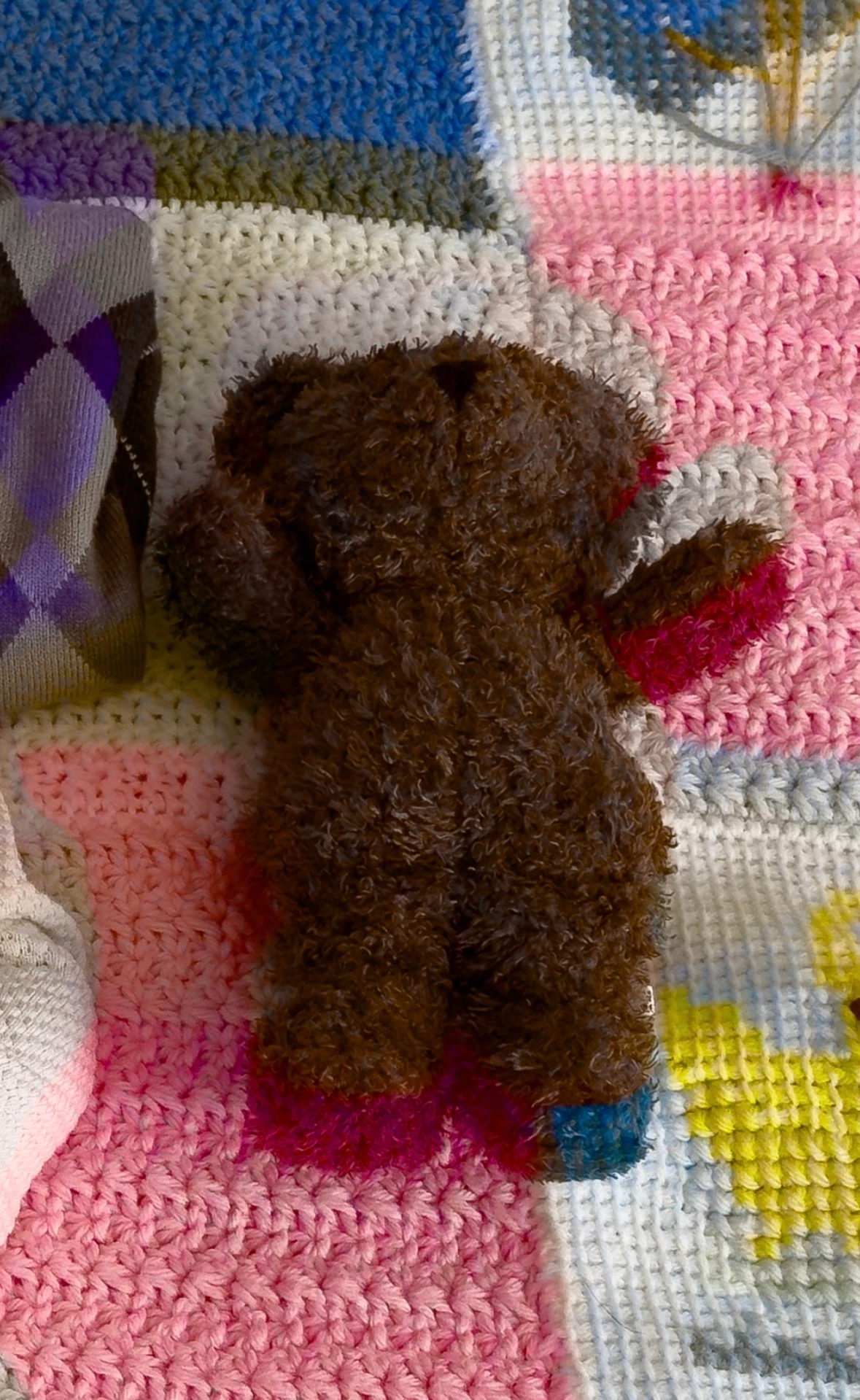
When import dng to LR on iPhone, sometimes the color shifts locations within the image. Not that the color values change, but all color can shift to a different part of the image, leaving the original location grayscale. (See included image). This does not happen for all imported dng’s, just a few seemingly at random. See image below. Anyone experienced this + know how to fix it? 


    1 reply

    Sameer K
    Community Manager
    Community Manager
    April 1, 2026

    Hey, @Driftwoodfoto. Welcome to the Lightroom Community. I'll help you figure this out.

    What version of Lightroom, iPhone, and iOS are you working on?


    Have you downloaded the DNG files from the internet? Does this happen with all images, or a few specific images?

    If it is with specific images, please share a few DNG images with me directly via direct message from my profile.

     
    Thanks!
    Sameer K
    (Type '@' and type my name to mention me when you reply)