AgentBrainpal
Participating Frequently
Feb 1, 2019 1:42 AM UTC
Answered

How to identify the preset applied to a photo

I cannot identify which preset i have applied to a particular photo

I cant recreate the circumstance where i SEEM to remember seeing a colored bar or tab alongside the name of the applied preset ( maybe this is not on mac os bur ios  and i do remember seeing it in the past) , but what i can confirm as i write thsi is that  if i use LRCC on MAC OS and I  load a photo in detail view, i cannot identify the preset that i applied to this photo

Is there a  method of  identifying the preset applied just as i can always see the profile applied?

thanks

This topic is closed to new replies. Start a new post to keep the conversation going.
99jon
99jonCorrect answer
Legend
Feb 1, 2019 12:44 PM UTC

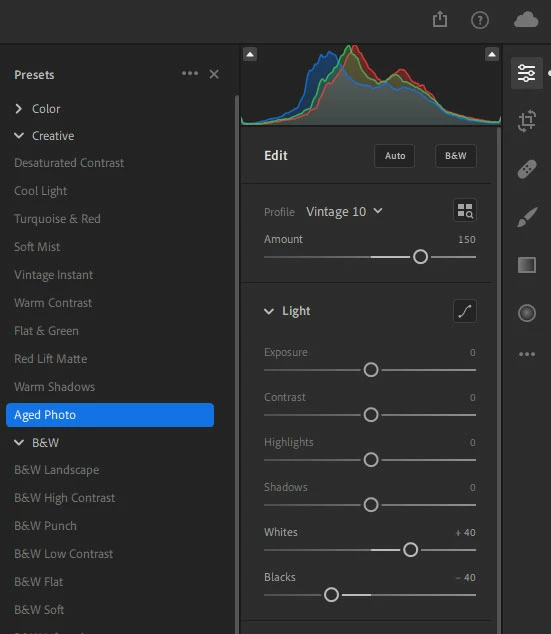
If you have the presets panel open and the categories expanded the applied preset will be highlighted in blue – see image below.

7 replies

Sep 11, 2023 1:51 PM UTC
0P3A9575.jpg
Translate
Sep 11, 2023 1:53 PM UTC

plzz reply me


Translate
Participating Frequently
Oct 6, 2022 7:04 PM UTC

This was a few years ago, does anyone know if it's possible to see what presets were applied? It's especially tricky when I edit on the app and desktop version b/c no edits are transfered over so any kind of history info would be helpful (beyond just "versions").

Translate
selondon
Community Expert
Community Expert
Feb 1, 2019 8:34 PM UTC

Yep, Jon is correct, just realised that the photos that I was looking at had subsequent adjustments, doh!

Translate
99jon
99jonCorrect answer
Legend
Feb 1, 2019 12:44 PM UTC

If you have the presets panel open and the categories expanded the applied preset will be highlighted in blue – see image below.

Translate
Participant
Sep 9, 2021 7:35 PM UTC

How do I expand the categories?


Translate
selondon
Community Expert
Community Expert
Feb 1, 2019 8:40 AM UTC

I’m pretty sure there isn’t a way (in Classic I think you can identify via the History).

The trouble is that if you make any further adjustment, it isn’t the Preset anymore.

You can add a vote here for the feature request:

Lightroom CC/Mobile: History Syncing | Photoshop Family Customer Community

Translate