
How to modify a file in photoshop without affecting lightroom settings
Here is a workflow rundown.
I have a batch of files that I imported into lightroom (straightening), edited in Photoshop (background removal), and made some final adjustments to in Lightroom (colour).
My initial process for background removal included the manual inclusion of a pure white background (as per client request), now the clients wants a transparent background. How do I make a modification in Photoshop without affecting the final lightroom settings?
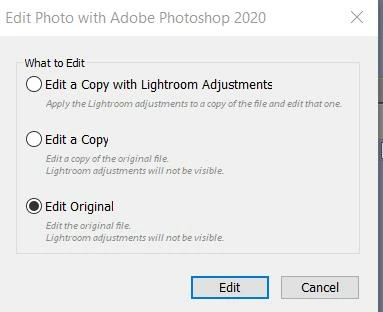
If I open the original or a copy of the original, I don't get any lightroom adjustments in photoshop and the act of turning off the white layer and saving will automatically revert the lightroom settings to nothing; as you know opening the "copy with lightroom adjustments" flattens the whole image defeating the purpose. I tried saving the lightroom metadata to the file with ctrl+S to no avail.
Does anyone have any idea on how to solve this problem?
I hope I clearly laid out the issue,
Thank you.
 AdChoices