
Participant
June 1, 2024
Question

How to remove distractions without using AI

  • June 1, 2024
  • 2 replies
  • 579 views

Hi all,


I want to use the "Remove" tool to remove distractions from my photos but I also want to avoid AI as much as possible in my art. Does all of the 'Remove' collumn in the Remove section use AI? Or is AI only used if the two checkboxes are ticked? I avoid using AI for ethical reasons.
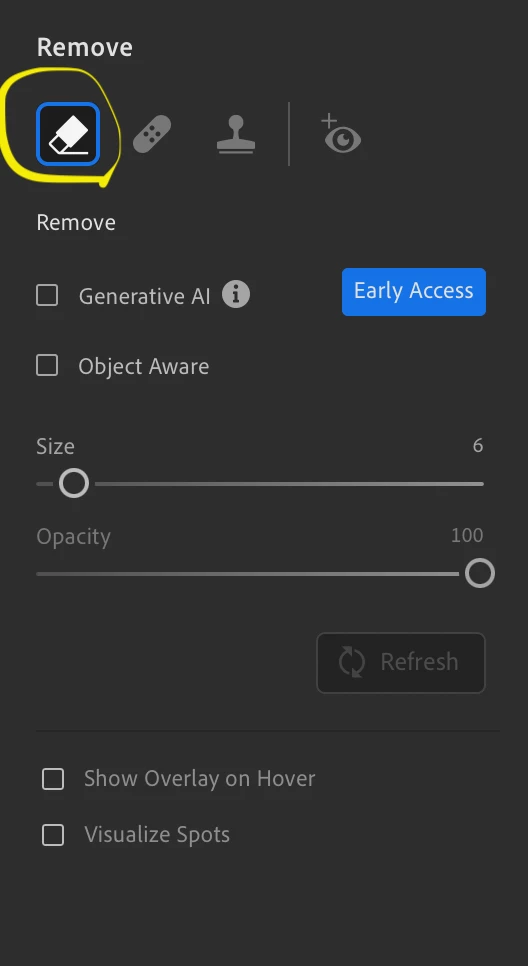


Alternatively I could try to use the clone or heal tool as a work around but wanted to check this first. Any help would be greatly appreciated. 

This topic has been closed for replies.

2 replies

Victoria Bampton LR Queen
Community Expert
Community Expert
June 3, 2024

Generative AI is the AI I think you want to avoid. .

Object Aware uses AI, but only to help create the selection, not to generate pixels. 

The Remove tool with Generative AI unchecked uses Photoshop's Content-Aware technology. I believe Adobe Sensei (their older AI tech) is involved in analyzing the nearby colours and textures, but it uses elements from the photo rather than generating pixels, so you can decide how AI that is!

Victoria - The Lightroom Queen
Participant
June 11, 2024

Hi Victoria, thanks for your input. If I wanted to avoid AI altogether, would the best option be to use the clone or healing tools instead? Do you know if AI is involved in the geometry tools as well?

Victoria Bampton LR Queen
Community Expert
Community Expert
June 11, 2024

Clone, Heal and Geometry have been around for donkey's years so I don't think there's any AI involved. Hopefully the definition of what is socially acceptable AI will get clearer over time. 

Victoria - The Lightroom Queen
Participant
June 3, 2024

Bump