
Participant
May 14, 2020
Question

How to switch local storage in lightroom photoshop

  • May 14, 2020
  • 1 reply
  • 455 views

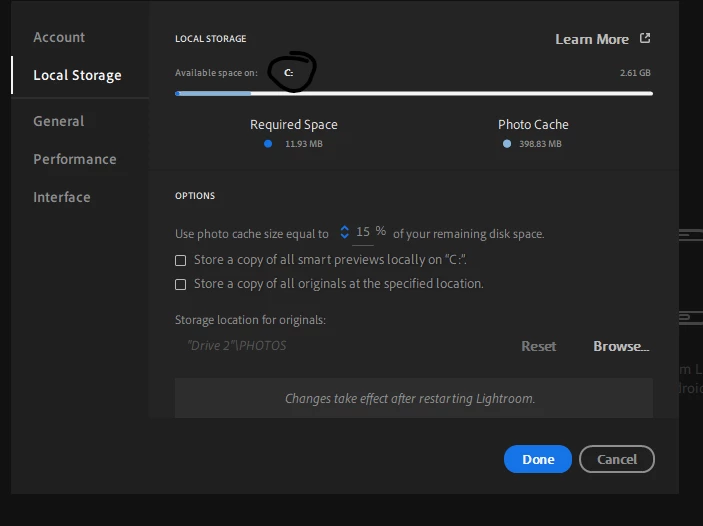
So I dont like the whole cloud storage with Photoshop Lightroom so I just pause uploading (I use photoshop lightroom because it looks better than creative classic), But it stores on my c drive? my small SSD. I don't want this, How do I switch the "available space on C:) to be a different drive, it uses up all my space instead of using my 10tb HDD. Lightroom is even installed on a different drive so why is it trying to put photo caches on c drive. Even switching Storage location for originals doesn't work. any help?
 

This topic has been closed for replies.

1 reply

selondon
Community Expert
Community Expert
May 14, 2020

The Catalog currently always has to reside on the C drive, you can add your vote to the feature request here to change that:

https://feedback.photoshop.com/photoshop_family/topics/when-specifying-a-storage-location-on-a-different-drive-lightroom-attempts-to-still-use-the-c-drive-for-storage

I think the problem may be that on the initial import, the application imports to the Catalog before uploading to the Cloud and purges these local files as per a percentage set in the preferences. After this you can store a copy of the originals that are in the Cloud at a location of your choice. As you are not uploading to the Cloud the photos are still in your local library.