


Participant
January 1, 2023
Question

How to utilize cloud storage? Does syncing to cloud require equivalent local device storage?

  • January 1, 2023
  • 2 replies
  • 197 views

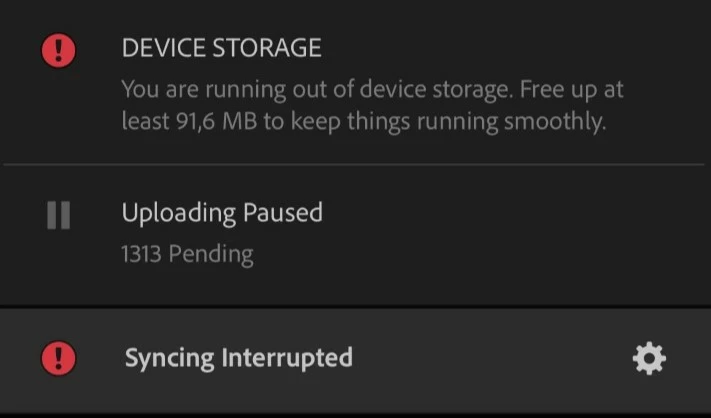
I bought 1TB Lightroom cloud storage, because I am running out of storage to store my photos on my phone. However, Lightroom is unable to sync my photos from the phone to the cloud since I do not have the equivalent storage on my phone. How on earth does the Lightroom require me to have the same storage for the photos on my phone? I buy the storage, because I do not have it. How to sync only to cloud, and not on local storage? How does the system require local storage, when I am storing things on cloud?
    This topic has been closed for replies.

    2 replies

    Abambo
    Community Expert
    Community Expert
    January 2, 2023

    Check if “download only smart previews” is on in Lightroom.


    Mobile devices normally shouldn't download the whole cloud. Desktop and Laptop devices do, I have, however, no clue, if they do also with Lightroom.


    I'll move this to the Lightroom forum, you will get more qualified answers about Lightroom there.

    ABAMBO | Hard- and Software Engineer | Photographer
    kglad
    Community Expert
    Community Expert
    January 1, 2023

    that's how the sync folder works.


    https://helpx.adobe.com/creative-cloud/kb/file-storage-quota.html


    in the future, to find the best place to post your message, use the list here, https://community.adobe.com/


    p.s. i don't think the adobe website, and forums in particular, are easy to navigate, so don't spend a lot of time searching that forum list. do your best and we'll move the post if it helps you get responses.


    <moved from using the community>