Hi @brunow1287160,
Thanks for the screenshots. What you’re seeing is expected with the current synchronization between Lightroom Classic and Lightroom.
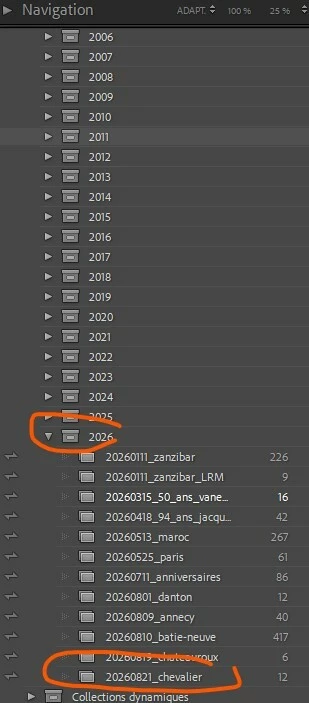
In Lightroom Classic, Collections can be synced with Lightroom and appear there as Albums. However, the Collection Set hierarchy itself is not synced.
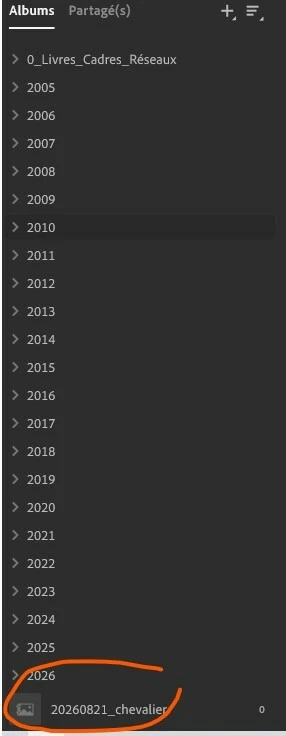
In your example, 20260821_chevalier is inside the 2026 Collection Set in Lightroom Classic. The collection synchronizes to Lightroom as an album, but its parent, 2026 Collection Set, does not synchronize to the corresponding Lightroom folder. This is why the album appears at the root level.
You will need to move it manually to 20260821_chevalier in the 2026 folder in Lightroom, but that folder organization is currently separate from the Collection Set organization in Lightroom Classic.
You can find more information about setting up Lightroom Classic Collections for synchronization here:
https://helpx.adobe.com/lightroom-classic/desktop/help/lightroom-mobile-desktop-features.html
I understand it would be useful for the Collection Set/Folder hierarchy to synchronize as well, and I’ll pass that feedback along to the team.
Best,
Anshul Saini




 AdChoices