
Known Participant
September 19, 2024
Question

Image exports from mobile look different than exports from desktop

  • September 19, 2024
  • 1 reply
  • 1027 views

Hi,

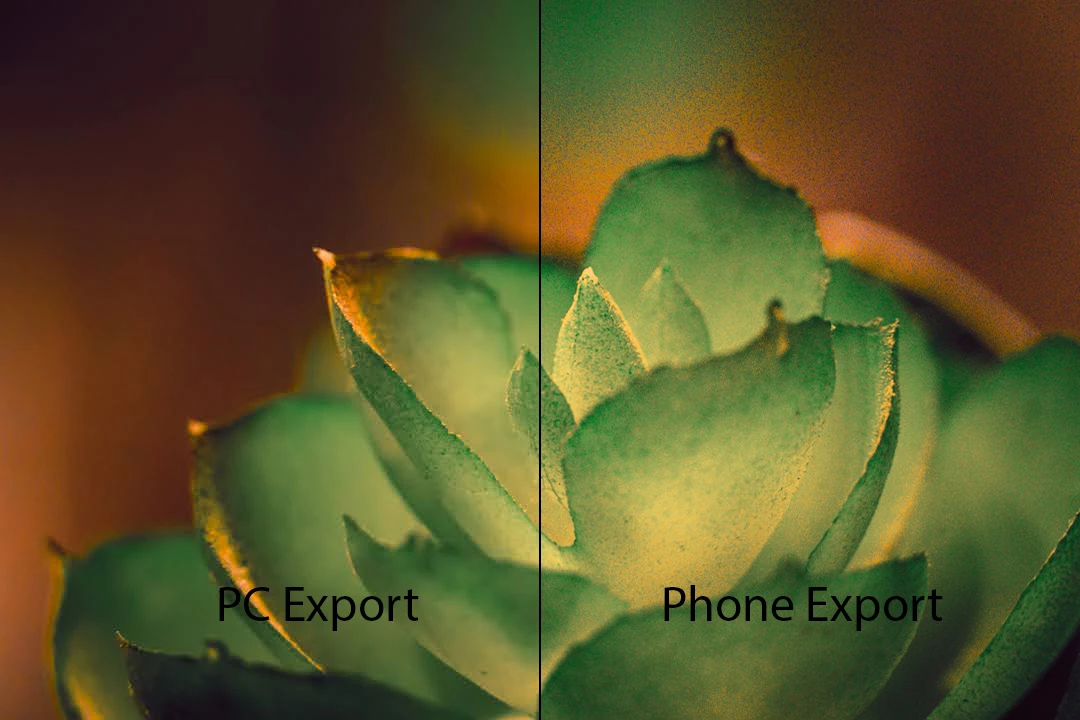
I'm running into some issues where the same photo exported from LR Mobile looks different than the same photo exported from the Desktop application.  The main difference is there is quite a lot of grain in the mobile image (see below).  The grain does not appear when looking at the edit in the Lightroom Mobile App either.  Only on export.  The app viewing experience is the same between PC and Mobile.

The settings are the same (1080p JPG at 100% Quality).  Phone is a Pixel 6 Pro and the PC's are Windows 11.

My suspicion is that there is some setting that was edited on PC that isn't there on mobile and so it doesn't get exported.  Like maybe denoise settings or something.

Tell me what info/files you need to repro the bug and I'll provide it.
1 reply

Rikk Flohr_Photography
Community Manager
September 19, 2024

Engineering has reviewed this report and has a few questions:


Can we ask the user what exact export was used?

  • Save to device
  • Share
  • Export As

What configuration was used here?


Was the export done from the grid or loupe edit view?

Is the original synced on the device? It can be checked by clicking on the cloudy icon.


Can we ask you to perform the 'Save to Device' operation or Export As -> Jpeg -> Largest available dimensions to ensure a proxy is not being used to render the final export?


Rikk Flohr: Adobe Photography Org
Known Participant
September 19, 2024

Hi Rikk,

I was using Export As from the edit view.
Cloud says "Synced and Backed Up"

I did both 'Save to Device' and Exported at Largest available.   With both of those options, it looks like it is supposed to look (same as the PC export), but whenever I export at 1080 it introduces all that grain.  I can provide those images if needed.

-Matt