


Participant
August 30, 2018
Answered

Import RAw Files already on Mac Drive

  • August 30, 2018
  • 1 reply
  • 415 views

I have already imported a few thousand RAW files into Lightroom Classic and they're already on my local Mac Drive. When I try to import the same files into Lightroom CC I get the message "Not enough free space on Mac Drive". Why does Lightroom CC need to create duplicate copies of all the photos already on the local drive? Why can they not simply link to files already on my Mac Drive? I have nearly 1 TB available in the cloud anyway so why does Classic CC expect duplicate copies of files on the local disk in the first place?

    This topic has been closed for replies.
    Correct answer Mohit Goyal

    Hi alunm,

    Lightroom Classic CC and Lightroom CC both are different software with the different workflow. Lightroom Classic CC works on smart preview where you need to have the local files connected to it. Lightroom CC is basically used for utilizing the cloud space instead of keeping images on local drive.

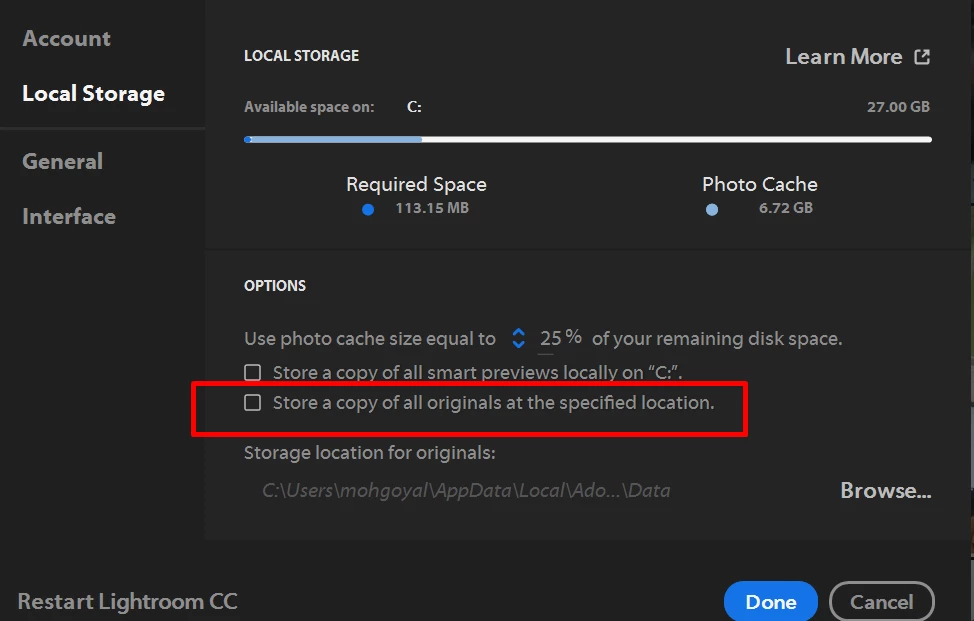
    You can uncheck the option highlighted in a below screenshot and Lightroom CC will not use the local drive space for saving the images.

    Regards,

    Mohit

    1 reply

    Mohit Goyal
    Community Manager
    Mohit GoyalCommunity ManagerCorrect answer
    Community Manager
    August 30, 2018

    Hi alunm,

    Lightroom Classic CC and Lightroom CC both are different software with the different workflow. Lightroom Classic CC works on smart preview where you need to have the local files connected to it. Lightroom CC is basically used for utilizing the cloud space instead of keeping images on local drive.

    You can uncheck the option highlighted in a below screenshot and Lightroom CC will not use the local drive space for saving the images.

    Regards,

    Mohit

    Participant
    August 30, 2018

    Many thanks

    Kind regards

    Alun

    Mohit Goyal
    Community Manager
    Community Manager
    August 31, 2018

    Your Welcome! Alun.

    Regards,

    Mohit