
bean4535
Participant
December 15, 2020
Answered

In-Application Images Look Desaturated, look normal outside the Lightroom 4.1

  • December 15, 2020
  • 1 reply
  • 276 views

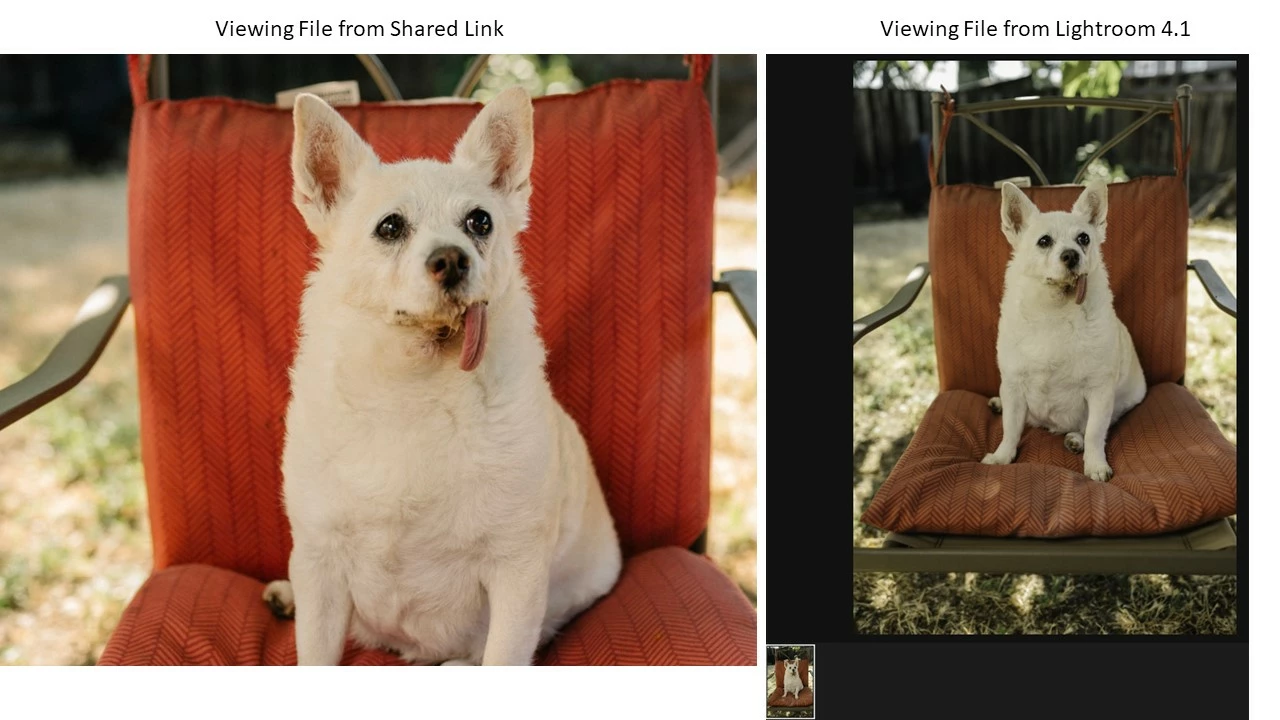
Hello, I didn't have this problem until I switched to 4.1. I've attached a file for reference. The in-Application photos look desaturated, with colors way off, but when I view the photo after export or link (using the same computer) the photo looks fine. I'm only getting this issue with the desktop application. Has anyone run into this issue before? 
 

I use a gaming PC and here are my specs: 


Windows 10

i7-10750H @ 2.6GHZ

32 Gigs of Ram

64 bit processor 

Nvidia GeForce RTX 2060 


Lightroom Version: 4.1 

20201120-1311-17d302b Build 


This topic has been closed for replies.
Correct answer bean4535

Hi All, 

just solved the issue. If you're receiving the same problem as me, please do the following: 


1) Go to your Nvidia control panel 

2) go to Change resolution 

3)  Choose output dynamic range to "Full" 


Other options to try: 


1) Control Panel

2) Color Management 

3) Clear any calibreation profiles from the external monitor

4) Choose SRGB (Default). 


hope this helps 

1 reply

bean4535
bean4535Author
Participant
December 15, 2020

One more thing to add, I tried all of the simple solutions to troubleshooting: uninstall, reinstall, reboot, checking monitor cables, using different ones, etc.. The only thing that worked momentarily was reverting to an older 3.0 version of the application. 

bean4535
bean4535AuthorCorrect answer
Participant
December 15, 2020

Hi All, 

just solved the issue. If you're receiving the same problem as me, please do the following: 


1) Go to your Nvidia control panel 

2) go to Change resolution 

3)  Choose output dynamic range to "Full" 


Other options to try: 


1) Control Panel

2) Color Management 

3) Clear any calibreation profiles from the external monitor

4) Choose SRGB (Default). 


hope this helps