Participating Frequently
July 28, 2026
Answered

Increase the font size for aperture, shutter speed, iso and focal length data

  • July 28, 2026
  • 2 replies
  • 17 views

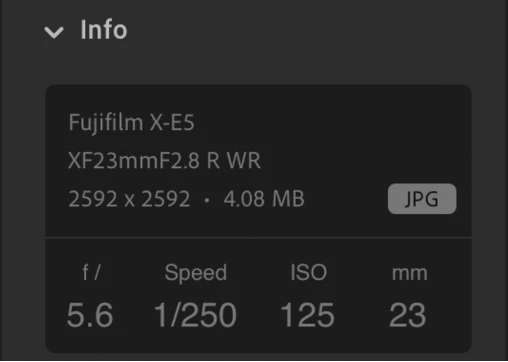
Large, high-res screens are obviously great for photography but the text on the panels does get quite small in the process.  For the most part the small fonts are not an issue, however when it comes to the exposure and related data it’s helpful to see that information at a quick glance.  To this end I offer the following as an alternate way to display that information so the numbers are larger and easier to view at a glance.  It also has the side benefit of requiring less vertical space.


    Correct answer Benjamin+Warde

    Thanks for the feedback!  While the particular layout you suggest may not work (the values of each can get to be quite a few more digits than you’ve shown, at which point they would likely be overlapping each other) your point that the text could be larger is fair.  Note that Lightroom does have an option to increase the text size (go into preferences, to the Interface tab and switch the Text Size pop-up to “Large”) however, while it does make most of the text in the UI larger, it doesn’t make the exposure text any larger.  🤦🏻 I’ll pass this feedback along to the team.

    2 replies

    sberleyAuthor
    Participating Frequently
    July 29, 2026

    Thanks!

    Benjamin+Warde
    Adobe Employee
    Benjamin+WardeCorrect answer
    Adobe Employee
    July 29, 2026

    Thanks for the feedback!  While the particular layout you suggest may not work (the values of each can get to be quite a few more digits than you’ve shown, at which point they would likely be overlapping each other) your point that the text could be larger is fair.  Note that Lightroom does have an option to increase the text size (go into preferences, to the Interface tab and switch the Text Size pop-up to “Large”) however, while it does make most of the text in the UI larger, it doesn’t make the exposure text any larger.  🤦🏻 I’ll pass this feedback along to the team.