Jatsson
Participant
February 20, 2021
Answered

Info overlays missing in Lightroom Desktop

  • February 20, 2021
  • 4 replies
  • 2750 views

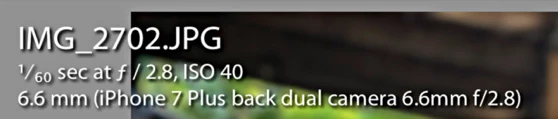
Hi, I'm new to Lightroom (i'm using the new LR, not LR classic). Earlier today i had the information overlays with camera information showing when browsing photos. But now it's gone somehow and I can't figure out how to get the info overlay to appear again. I can see the info overlay in the iOS iphone and iPad app but not in the Desktop or Web version.  Please help.


The below picture shows the info overlay info that i'm missing.
Correct answer Michael J. Hoffman

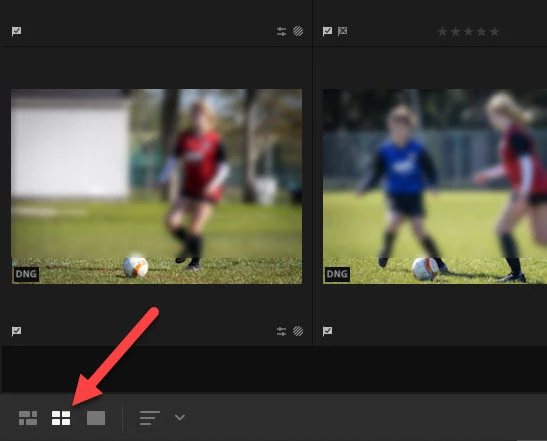
There is no info overlay like you see in LR Classic, available in the new Lightroom. However, depending on whether you choose the "photo grid" or "square grid," You will see some badges and extra bits of information overlaid onto the thumbnails:


4 replies

Participant
June 29, 2025

I am missing this feature too.

Rob_Cullen
Community Expert
Community Expert
June 30, 2025

@Michael375854106m0k   It is not available in Lightroom.!


Regards. My System: Windows-11, Lightroom-Classic 15.1.1, Photoshop 27.3.1, ACR 18.1.1, Lightroom 9.0, Lr-iOS 10.4.0, Bridge 16.0.2 .
erikssou
Participant
November 2, 2022

Hi, do I understand this correct that I have to switch between 'edit' or 'info', you can't display the info (exif data) when editing, as in the LR Classic, when in the LR 6.0 desktop?


Really strange that it's removed. How do I vote for this as an Enhacement?


Thanks /ulf

melissapiccone
Community Expert
Community Expert
November 2, 2022

When you make a post, choose idea instead of discussion


Melissa Piccone | Adobe Trainer | Online Courses Author | Fine Artist
Michael J. Hoffman
Community Expert
Michael J. HoffmanCommunity ExpertCorrect answer
Community Expert
February 21, 2021

There is no info overlay like you see in LR Classic, available in the new Lightroom. However, depending on whether you choose the "photo grid" or "square grid," You will see some badges and extra bits of information overlaid onto the thumbnails:


Jatsson
JatssonAuthor
Participant
February 21, 2021

Thank you for your answer Michael. I was sure I saw the info overlay in new LR at some point but I guess it was just wishful thinking mixed with memories from classic. 

Rob_Cullen
Community Expert
Community Expert
February 20, 2021

I suggest your screen-clip is the 'Info' in Lightroom-Classic. Toggled by keyboard [i]

In Lightroom-Desktop v4.1 the [i] key toggles the Info PANEL to the right of the photo.

Confirm exactly which Lr version you are using. (MENU: Help > System Info)


Regards. My System: Windows-11, Lightroom-Classic 15.1.1, Photoshop 27.3.1, ACR 18.1.1, Lightroom 9.0, Lr-iOS 10.4.0, Bridge 16.0.2 .