
ChrisPearson100
Known Participant
December 6, 2019
Answered

Inneficient Preset management in Lightroom Classic - Preset groups

  • December 6, 2019
  • 1 reply
  • 904 views

I have hundreds of presets in Lightroom which I store under different group headings, as below.
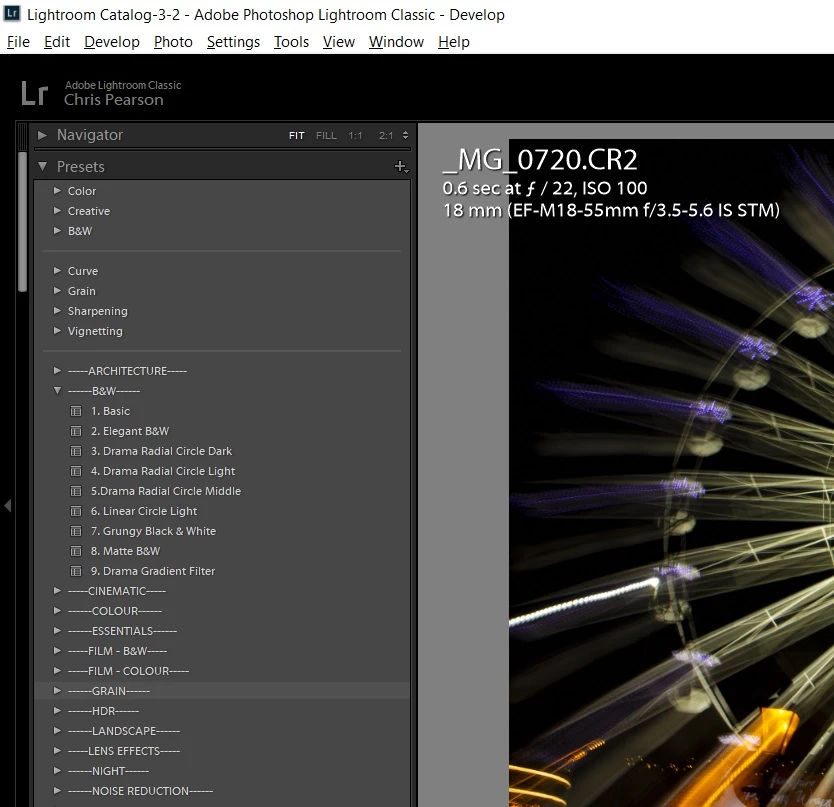
 

To add the groups, I use the 'Create new preset' option, and to create the group I select 'group' - 'new group'.


The issue I have is if I import new presets, I don't have the option to import directly to a group.  The files just get added to the bottom of the list and I have to append them to the group manually by dragging them up and down the preset menu and placing them in the correct group which is really time consuming.


Is there a way to do this more efficiently, or is this an update Adobe are considering for future versions?


{Thread renamed by moderator}


This topic has been closed for replies.
Correct answer john beardsworth

Try the plugin Fix Presets http://www.johnrellis.com/lightroom/fixpresets.htm . I haven't used it but think it does what you need.

1 reply

Sahil.Chawla
Adobe Employee
Adobe Employee
December 6, 2019

Hi Chris,


Have you tried right clicking on a Perest Group and choose Import to directly import presets into that group and see if that works?

Please check this article and let us know if it helps: https://filtergrade.com/how-to-create-preset-folders-in-lightroom/


Regards,
Sahil


ChrisPearson100
Known Participant
December 6, 2019

Thanks Sahil.


That does work for imprting new presets, but not for my unsorted existing presets.


What would be useful is if it were possible to be able to manage presets in explorer/file manager as I seem to recall being able to do in older version of Lightroom.


Regards,


Chris.

john beardsworth
Community Expert
john beardsworthCommunity ExpertCorrect answer
Community Expert
December 8, 2019

Try the plugin Fix Presets http://www.johnrellis.com/lightroom/fixpresets.htm . I haven't used it but think it does what you need.