


Participant
June 29, 2026
Question

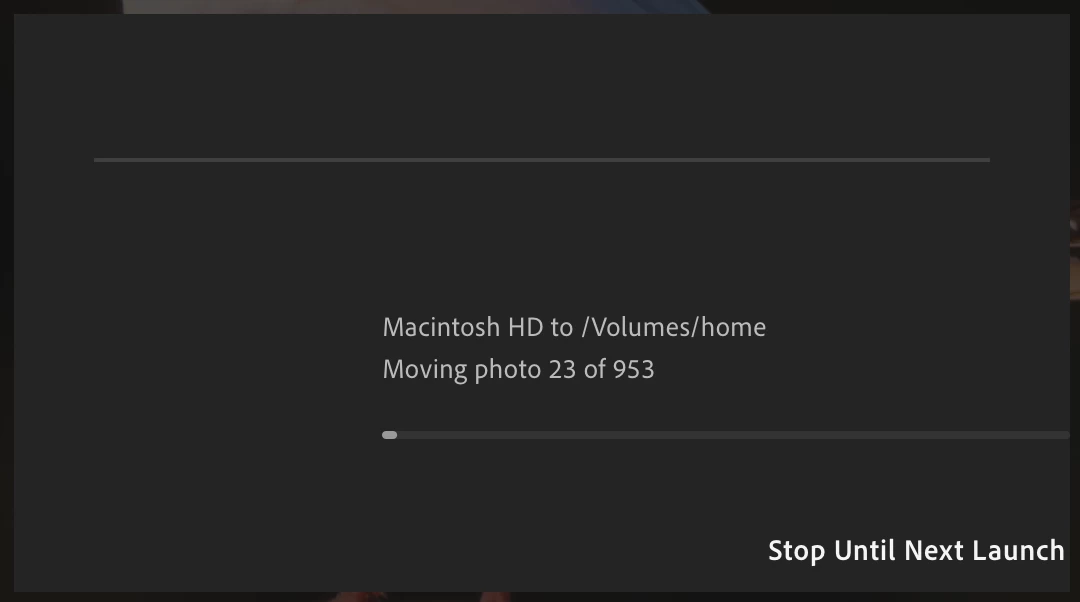
Latest Update 9.4 Broke Cloud Sync App Freezes While Moving Photos

  • June 29, 2026
  • 1 reply
  • 6 views

You broke sync. Not only is the window messed up, it also gets stuck (even more than it used to!) and the whole app hands. But charging credit cards works every month, so what’s the big issue, aight?
 

    1 reply

    Anshul_Saini
    Community Manager
    Community Manager
    July 2, 2026

    Hi ​@mikes99580235,

    Thanks for reporting this and for sharing the screenshot. I can see the sync appears to be stuck while moving photos, and I understand how disruptive that can be.

    To help us narrow this down, could you please answer a few questions?

    • Where are the photos being moved from and to? (Internal drive, external drive, NAS, cloud storage, etc.)
    • Are you using the latest Lightroom Desktop 9.4 on macOS 26.X?
    • The screenshot shows 953. Does it always stall on larger batches, or also with a small number of photos?)
    • Does the app eventually recover if left running, or do you have to force quit it every time?

    Also, could you please try the following:

    • Check Files & Folders permissions under Privacy & Security, especially if you’re moving files to or from an external drive or another volume.
    • As a quick test, try moving a small batch (5–10 photos) between the same locations and let us know if that completes successfully.

    It would also be very helpful if you could record a screen recording starting from launching Lightroom, then continue recording through your workflow until the issue occurs, including Force Quitting the app if that’s required. That will help us understand exactly what happens leading up to the hang.

    Please upload the screen recording video to Google Drive, Dropbox, WeTransfer, or a similar file-sharing service, then send me the download link via DM (click my profile and select Send Message).

    Finally, could you share your System Info?
    Go to Help > System Info, copy the contents, and paste them here.

    With those details, we’ll be able to investigate this further.

    Best,
    Anshul Saini