Sovon
Participating Frequently
May 7, 2019
Question

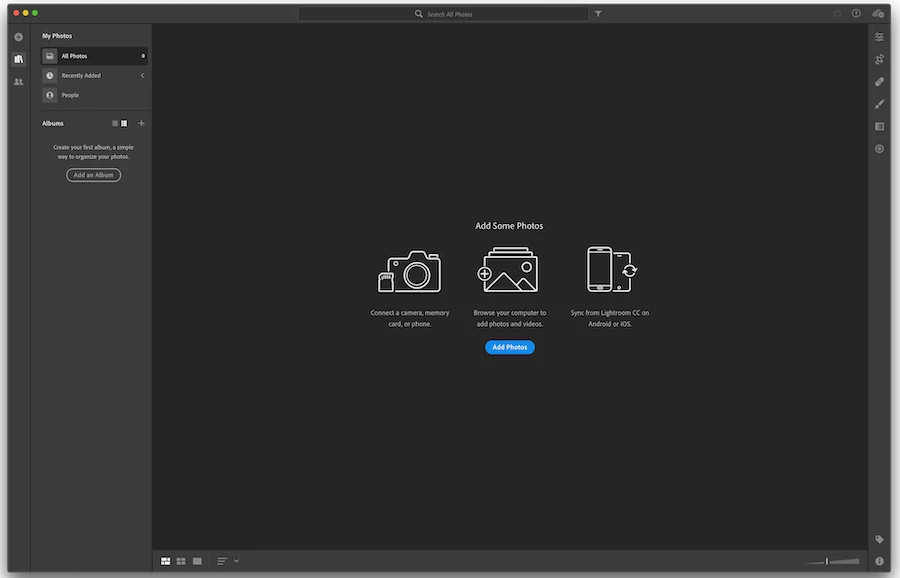
Library Became Empty All of a sudden
  • May 7, 2019
  • 4 replies
  • 1013 views

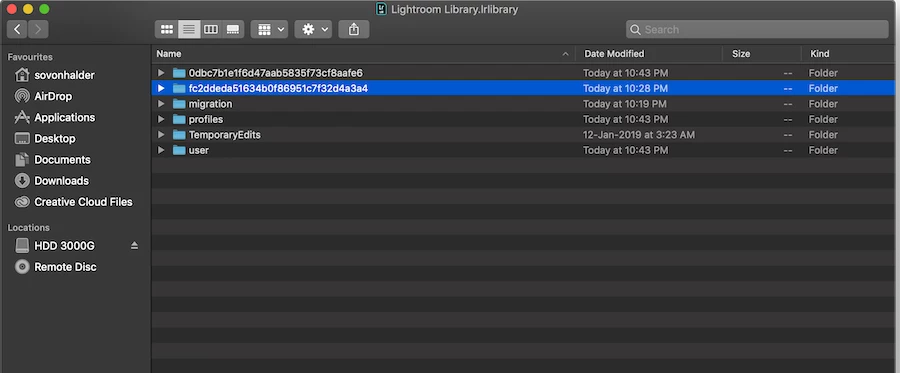
The folder 'fc2ddeda51634b0f86951c7f32d4a3a4' should be the one which has all original files) But somehow every time I start the app Lightroom CC, it creates a new folder '0dbc7b1e1f6d47aab5835f73cf8aafe6' which is empty.

Please help. Thank you.

This topic has been closed for replies.

4 replies

Sovon
SovonAuthor
Participating Frequently
May 19, 2019

Can anyone please tell me how to add the library from my old corporate ID to my current corporate ID (email ID being same)?

Need help. Thanks.

KenJ Studios
Participating Frequently
May 9, 2019

Any update?

Sovon
SovonAuthor
Participating Frequently
May 9, 2019

I'm desperately waiting for a solution. If it doesn't work, I'm screwed. I have project works.

NOTE: I'm signed in via my Organiztion's creative cloud subscription (activated on my office mail ID). Few days ago they upgraded my license from CC 2017 to CC 2019. And in the process I was told that my subscription ended & I had to log out and then log back in, in my adobe application manager. I'm not sure if it has anything to do with the problem that happened. Just thought that I should mention for the record.

My library is still empty completely. Please help.

KenJ Studios
Participating Frequently
May 9, 2019

It sounds like you’re logging into a new/different account now.  Did your login information change when they upgraded the version?

Have you tried logging into the Lightroom web interface http://lightroom.adobe.com ?

Also, if you go into that original folder, does it contain anything?

KenJ Studios
Participating Frequently
May 7, 2019

I don’t have any answers, but this post scares me.  I’m in the process right now of migrating from LR Classic CC to the cloud based LRCC.  I’m interested to hear how this turns out.

Sahil.Chawla
Adobe Employee
Adobe Employee
May 7, 2019

Hi Sovon,

That shouldn't be happening, as Lightroom CC library is empty, could you please let us know if you're signed in, by clicking on the Cloud icon on the top right corner?

Also, please let us know the version of Lightroom CC and operating system you're working on. As that would be helpful for us to troubleshoot further.

Regards,
Sahil

Sovon
SovonAuthor
Participating Frequently
May 7, 2019

I am logged in through my enterprise ID & lightroom is up to date. I'm on MacOS Mojave 10.14.4. Lightroom CC version as follows: