


Lightroom 8.1 crop overlay not visible unless cursor hovering
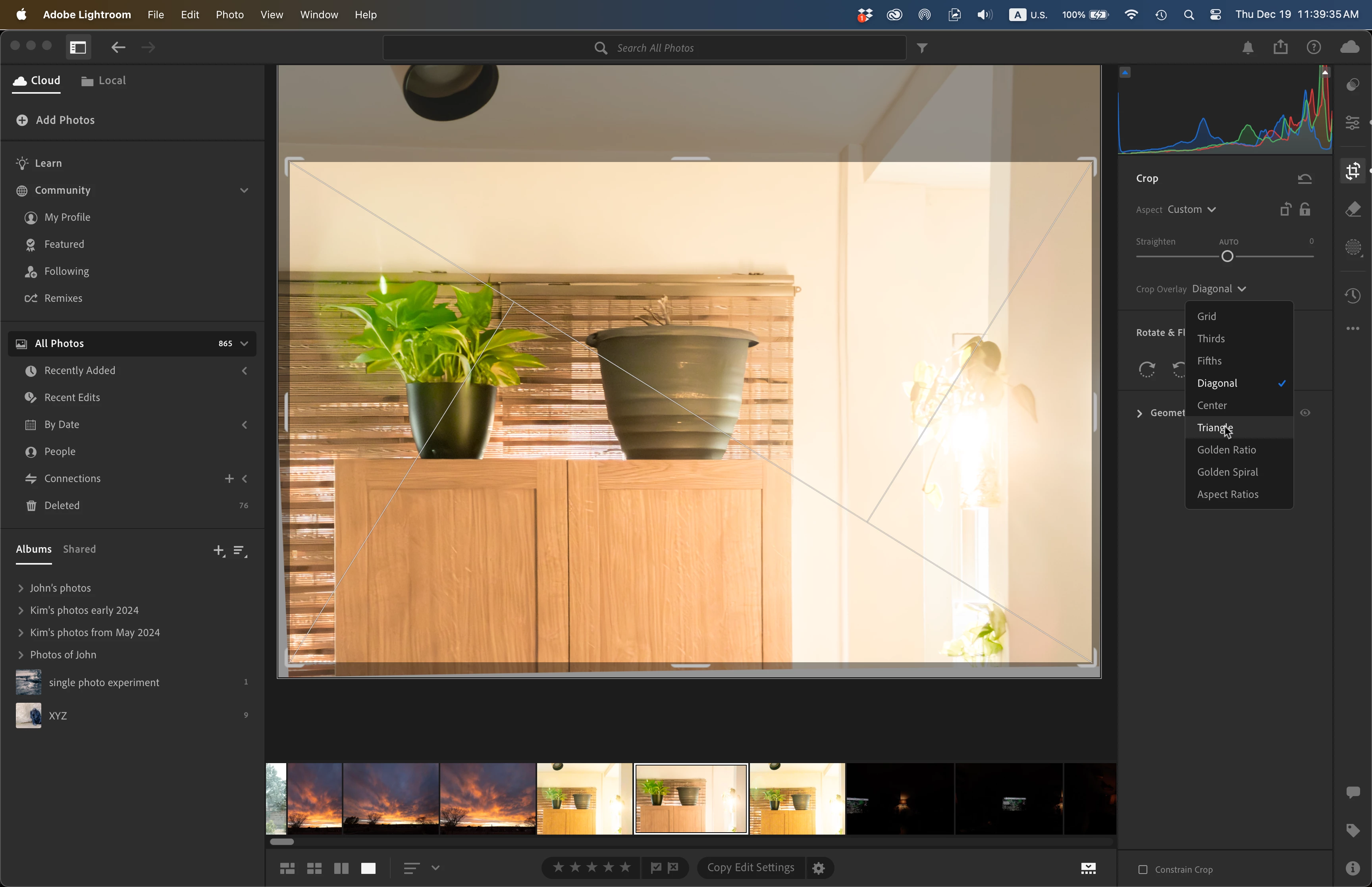 The crop overlay does not show unless the disclosure triangle is clicked and the cursor is hovering over the name of the overlay. In my screen shot, the cursor is hovering over Triangle.
If the cursor moves away, the overlay disappears. Press Shift+O won't toggle through an overlay's choices while the cursor is hovering and showing the overlay. The cursor has to move away, Shift+O pressed, then the cursor has to move back over the overlay name in order to show the overlay.
Cmd+O does not toggle visibility of the overlays unless the cursor is hovering over an overlay name.
I haven't rebooted the Mac as yet. I had just rebooted last night after updating the macOS from 14.7.1 to 14.7.2.
I'm wondering if this hovering in order to show the overlay is the expected behaviour or if I should create a bug report. I believe that this is the first time I've wanted to see the crop overlay when using Lr, so I don't know if previous versions had this behaviour.
In LrC 14.1.1 the overlay automatically shows, pressing O toggles through the overlay main choices and Shift+O toggles through the orientations for those overlays such as golden ratio or triangles.


 AdChoices