
Participating Frequently
May 15, 2026
Question

Lightroom 9.3.1 - Exporting takes forever & stuck on "preparing"

  • May 15, 2026
  • 1 reply
  • 9 views

LR 9.3.1 on Mac OS 26.4.1 with an M4 Pro chip and at least 200gb of free memory. so why, after the recent LR update, does it take the $240/yr app 19 minutes to export 16 pictures? 

it took five minutes to go from “preparing….” to actual exporting. I used to be able to export 30+ pictures in about 30 seconds - pictures i take with a 46MP camera. 

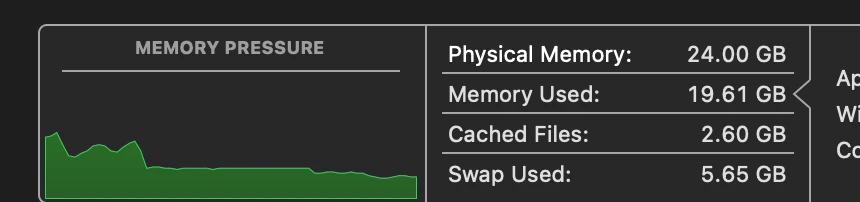
is it because Lightroom is using almost all of the 24gb of RAM i have? 
i try this with full graphics acceleration enabled (use GPU for Export) and without (not using GPU for export). it makes no difference. 

so i ask you, why is my perfectly functional hardware and updated software suddenly incapable of doing anything quickly?

    1 reply

    Claire H.
    Community Manager
    Community Manager
    June 2, 2026

    Hi @thermogod, Thanks for reaching out! Let's try a few things to see if we can fix this export issue.

    • Make sure your graphics driver is up to date. If your graphics processor is incompatible, uncheck the Use Graphics Processor option in Lightroom > Preferences > Performance.

    • Ensure that the hard drive storing your Lightroom catalog, previews, and image files has at least 20% free space. If not, free up space to improve performance.

    • Temporarily pause any syncing with Lightroom CC while exporting to reduce the load on your system. You can resume syncing after the export is complete.

    If none of these steps work for you, can you send your system info? You can find your system info by going to Help > System Info, copying and pasting it into a text file, and attaching it here. Thanks! ^CH