
Participant
December 21, 2018
Answered

"Lightroom" album created in Photos app - delete album but not photos?

  • December 21, 2018
  • 1 reply
  • 598 views

Sorry for the unwieldy title, hope it's clear enough. When I export photos from Lightroom to my camera roll, they are saved not only to the camera roll but also within a specific album called "Lightroom".

My question is: can I delete this album without deleting the photos inside from my camera roll? I have no need of a Lightroom-specific album (I'm a bit of an organisational freak, so its presence is bothering me a little alongside all my actual photo albums).

Not sure how to test this without deleting the album myself and potentially having the export all the photos again.

Thanks!
This topic has been closed for replies.
Correct answer Michael J. Hoffman

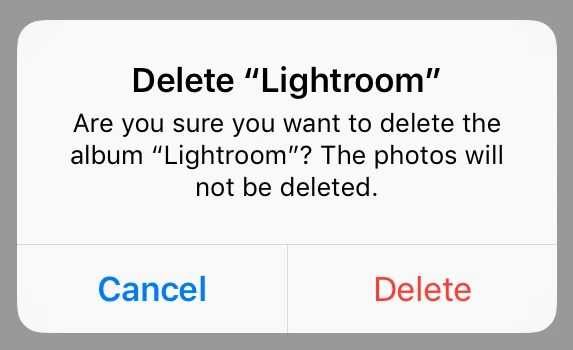
You could test this an another album you created to see what happens! But, not to worry - when you delete the album you get this prompt:

The photos will will remain in “All Photos.” Deleting an album in iOS Photos is just like deleting an album in Lightroom CC. The association list of photos is deleted but the photos are not touched.

Mike

1 reply

Michael J. Hoffman
Community Expert
Michael J. HoffmanCommunity ExpertCorrect answer
Community Expert
December 21, 2018

You could test this an another album you created to see what happens! But, not to worry - when you delete the album you get this prompt:

The photos will will remain in “All Photos.” Deleting an album in iOS Photos is just like deleting an album in Lightroom CC. The association list of photos is deleted but the photos are not touched.

Mike

Participant
December 23, 2018

Thank you so much!