
donboys
Participant
June 21, 2019
Answered

Lightroom All Photos question

  • June 21, 2019
  • 1 reply
  • 368 views

Just recently added Lightroom mobil to iPhone Xr and new iPad Air.  On my desktop iMac using Lightroom I created two collections and synced those to Lightoom mobil.  They both appear on my mobil devices under albums as expected.  The unexpected thing is I am also seeing  a number of images that I took on my phone and are in Photos, but may not be in Lightroom.  I did not create a collection for these.  Why am I seeing the in Lightroom mobil on both my phone and iPad.  It appears the mobil apps are acting as a browser and looking at the Photos app.  What images are actually stored in the Adobe cloud then? 

Thanks

Don
This topic has been closed for replies.
Correct answer Michael J. Hoffman

According to your screen shot, you’ve importEd and synced 236 photos, of which only 48 are in named albums/collections.

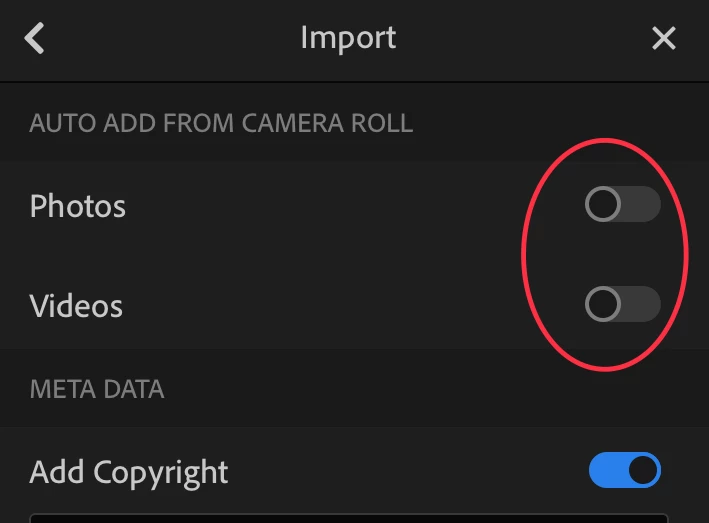
Its likely that that you have the option enabled in Settings > Import to “Auto-add from camera roll.” With this setting enabled, every time you open LR, it will import everything from your camera roll since the last time it imported.

Heres a screen shot of the settings im talking about:

1 reply

99jon
Genius
June 21, 2019

Hi Don

All imports must go through Apple photos. You can delete from. camera roll afterwards.

I think Apple is planning to reduce this duplication in a future iOS update.

donboys
donboysAuthor
Participant
June 22, 2019

I don't believe this explains what I see.  I did synch two collections in Lightroom (on my iMac) , a total of 48 images, and Lightroom shows the synched sign.  In Lightroom mobil the two synched collections appear as Albums.  That's all I expected to see in Lightroom Mobile on my IOS devices  – a total of 48 images.  But under All Photos on both my iPad and iPhone it says I have 236 images total.  The unexplained images were originally taken on my iPhone Xr and should appear in the Camera Roll and my iCloud, thus on all my devices.  But why do I see them through the  Lightroom Mobile app?  Why do I only see under 300 images in Lightroom Mobil (All Photos) when I have over 4000 in iCloud if Lightroom Mobil is a browser?

Life is confusing!  Thanks for trying to help!

Michael J. Hoffman
Community Expert
Michael J. HoffmanCommunity ExpertCorrect answer
Community Expert
June 22, 2019

According to your screen shot, you’ve importEd and synced 236 photos, of which only 48 are in named albums/collections.

Its likely that that you have the option enabled in Settings > Import to “Auto-add from camera roll.” With this setting enabled, every time you open LR, it will import everything from your camera roll since the last time it imported.

Heres a screen shot of the settings im talking about: