
Participant
May 28, 2024
Question

Lightroom CC ecosytem folder

  • May 28, 2024
  • 1 reply
  • 206 views

Hi

I am a longtime Lightroom Classic user and have just started the switch to using Lightroom desktop and mobile. The switch has been fairly painless  except for one issue which is puzzling me. I have a folder in Lightroom Classic called Lightroom CC ecosytem.
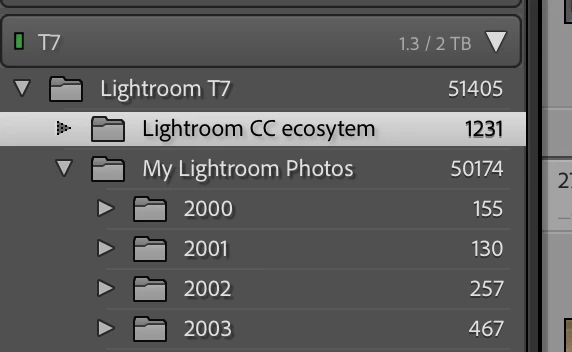
All the photos I am uploading to the cloud from Lightroom desktop and Lightroom mobile are being downloaded into this folder on my hard drive. This wouldn’t be a problem except for any photos I delete from the cloud are not deleted from this folder. This means I am ending up with 100s of unwanted photos in the folder. Strangely if I delete a picture from the folder it is deleted from the cloud.


Can anybody explain to me the purpose of this folder? Is there anyway of disabling this folder?


Thanks


David

This topic has been closed for replies.

1 reply

Victoria Bampton LR Queen
Community Expert
Community Expert
May 31, 2024

That's a folder you've created rather than one created automatically. I'd suspect it's one you've set as the download location in Preferences > Lightroom Sync tab. You can change that setting to any other folder of your choice.


I think you might need to take a step back and review your workflow... are you intending to move completely to Lightroom Desktop and give up Classic? If so, you'd want to use the migration tool. If you plan to keep using both, it'll get a bit more complicated.


(Do I recognize your folder structure from another forum? Or is it just deja vu?)

Victoria - The Lightroom Queen
DaviddpsAuthor
Participant
May 31, 2024

Hi Victoria


Thank you for your reply particularly as you are right and you have responded to me asking the same question on your forum. I had no response to this query on this forum so posted on your forum. Apologies!


I think in the short to medium term I will be using both LrC and Lightroom desktop. I use DXO pro so the LrC plugin is quite useful. I also like the batch file renaming functions in LrC. Following you previous response to me I have altered my workflow and now I import all photos into Lightroom cloud using either Lightroom mobile or Lightroom Desktop. I then review the photos and reject any I want to delete. I can then delete those rejected photos from the cloud and from my  Sync folder in LrC. It seems to work okay for me at the moment but I would welcome any comment.


Thanks again for your help


David

Victoria Bampton LR Queen
Community Expert
Community Expert
May 31, 2024

Oh great, let's carry on over there then. It gets messy when we're split between two places. If you copy this same text to that other thread, I should pick it up. I lose track of too many people otherwise!

Victoria - The Lightroom Queen