
Lightroom CC is not deleting removed pics
Hello everyone.
I'm an happy customer of Lightroom CC and his powerful cloud.
After 1 year I found the workflow very efficient, but this week I got the first problem.
I uploaded a full wedding in one of my folders using my iPad pro as backup and after the final editing and an external backup I did in one of my HD, I canceled the 640 raws from the cloud first and also I've removed the containing folder.
After a while checking the size of the cloud and the size of the original backup of Lightroom in my first HD I found:
this in LR CC
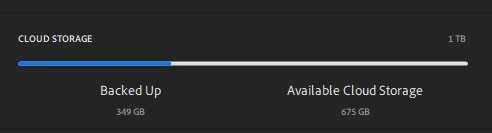
and this in the originals folder selected by Lightroom CC as a backup
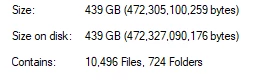
So a started the check, CANCELLED in the HD the originals and moved to another drive , and lightroom startd the download of the whole library in the second original folder.
At the end.. SAME SPACE, 439gb instead of 349!
So , during the inspection, I found the date of the wedding of above and I found the WHOLE wedding with 640 raws still there, so that means Lightroom cancelled the accounting of the images in the space but is still managing more images: in the cloud without taking the space we can see; in the original HD folder.
Some suggestions to be able to clean the cloud and to have a real backup original folder?


 AdChoices